Excel VBA Outlook 초안 저장: 첨부 재확인과 재실행 차단 예제
여러 메일을 만들다 두 번째 행에서 멈췄을 때, 다시 실행하면 첫 번째 초안이 중복될 수 있습니다. 이 글은 자동 발송을 구현하지 않습니다. 두 건의 가상 초안을 저장하고 실제 저장 항목·첨부를 다시 읽어 확인한 뒤, 시도 흔적으로 무심코 재실행하는 것을 막는 코드를 다룹니다.
지금 확인한 것은 ZIP 입력 바이트, Python 참조 검사와 VBA 코드 구조입니다. Outlook·Excel을 실행하거나 실제 초안을 만들지 않았습니다. SMTP 전송·외부 서버 접속도 하지 않았으며 성공한 Outlook 영수증을 꾸며 첨부하지 않습니다.
연습 입력은 실제 수신자를 받지 않습니다
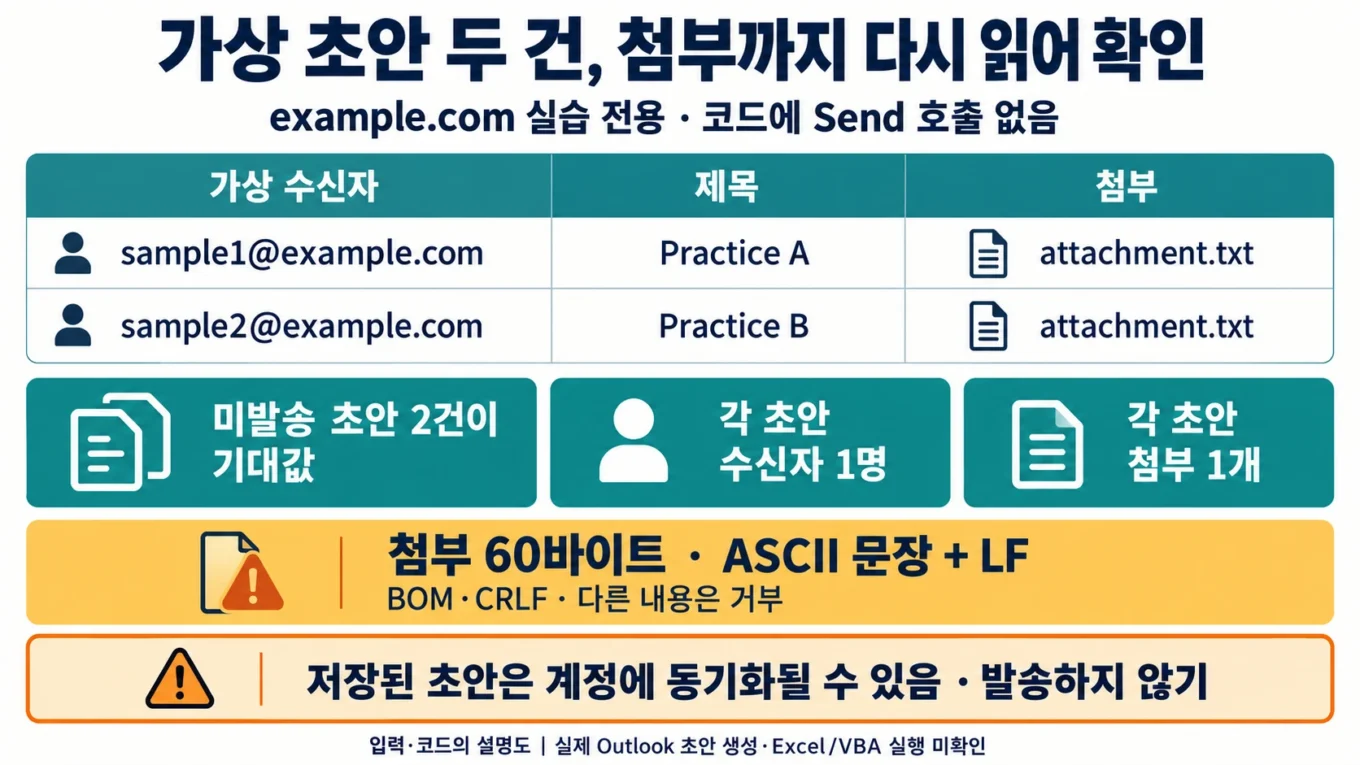
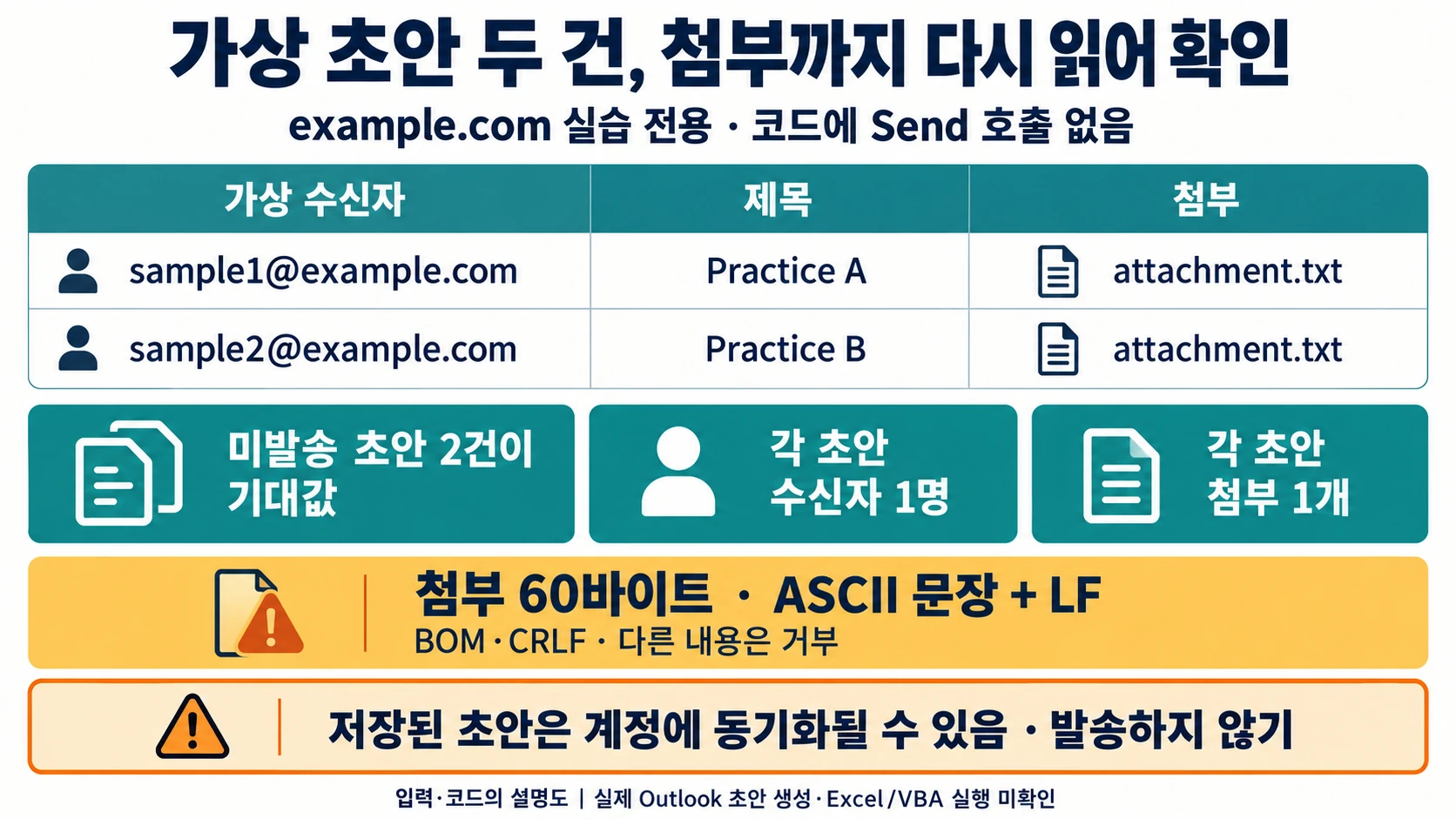
practice-68.xlsx의 Recipients에는 아래 두 행만 있습니다. 별도 outlook-draft-demo.xlsm으로 저장하고 attachment.txt와 같은 쓰기 가능한 로컬 연습 폴더에 둡니다. Windows의 클래식 Outlook을 대상으로 한 예제이며 다른 Outlook 제품에서의 COM 호환성은 확인하지 않았습니다.
| Subject | Attachment | |
|---|---|---|
| sample1@example.com | Practice A | attachment.txt |
| sample2@example.com | Practice B | attachment.txt |
코드는 도메인이 정확히 example.com인 제한된 ASCII 주소만 허용합니다. 이는 실습 범위를 좁힌 규칙이지 일반 이메일 주소 검증기나 실제 전달 가능성 검사기가 아닙니다. 같은 수신자·제목 조합의 중복, 제어 문자 제목, 수식 입력 셀, 병합·오류 셀, 불완전한 꼬리 행은 거부합니다. 데이터 행 상한 30은 실습 제한이며 처리 속도 보장이 아닙니다.
첨부는 다음 ASCII 문장 뒤 LF 한 바이트를 붙인 파일입니다. CRLF나 BOM으로 다시 저장하면 같은 글자로 보여도 이 예제의 바이트 계약과 달라집니다.
Synthetic attachment for an Outlook draft. No private data.파일명은 attachment.txt로 고정하고 절대 경로나 상위 폴더 경로를 받지 않습니다. 개인 파일을 이 이름으로 바꿔 넣어도 내용 바이트가 달라 거부됩니다.
저장 전 기록과 확인 완료는 다른 단계입니다
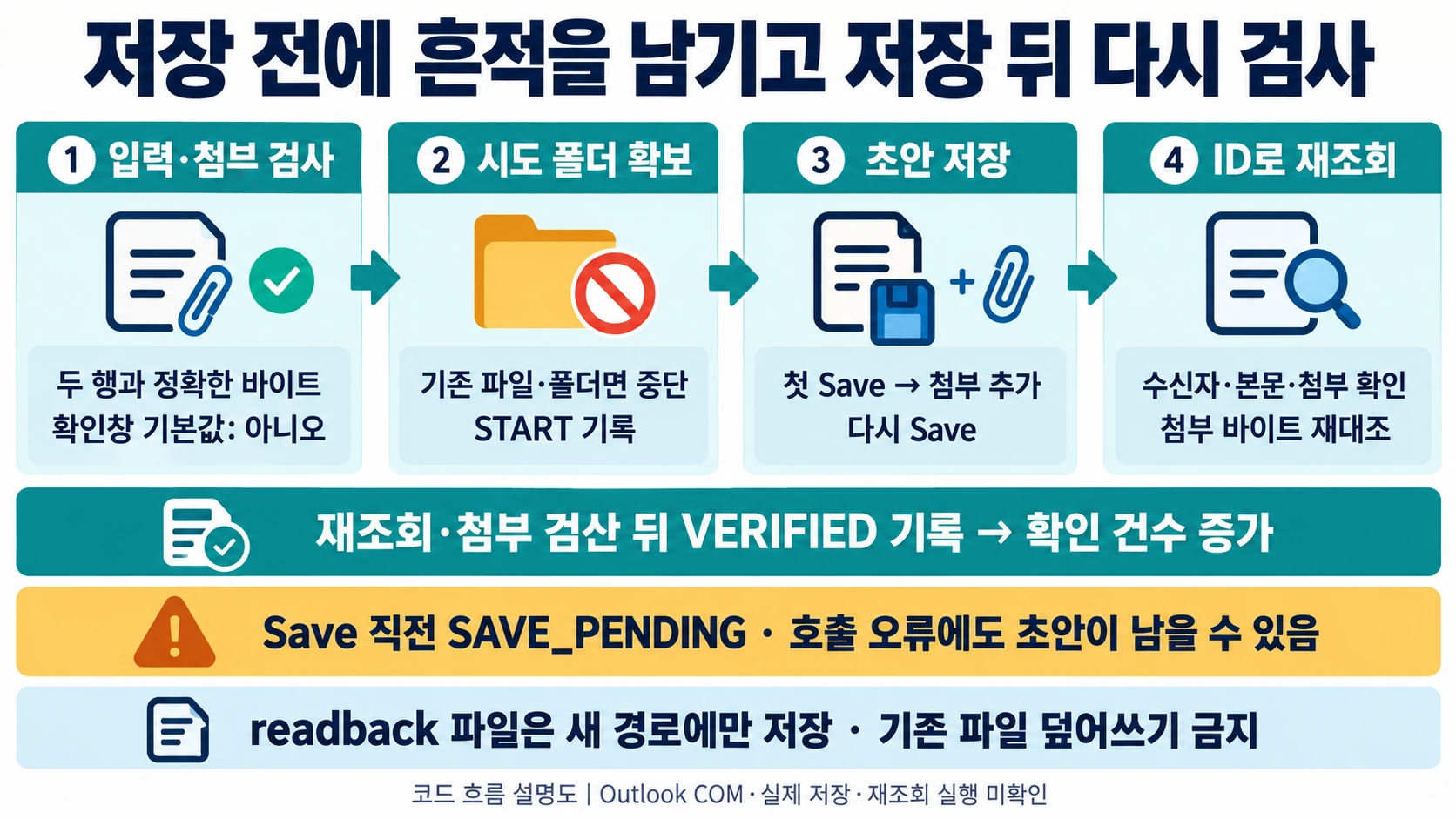
실행은 입력·첨부 검사와 기본값이 “아니오”인 확인창을 거친 뒤 blogops-outlook-practice-attempt 폴더를 새로 확보합니다. 이 이름의 파일이나 폴더가 이미 있으면 초안을 만들기 전에 중단합니다. 기존 시도 흔적을 자동 삭제하지 않습니다.
새 Outlook 항목을 Save하면 그 항목 유형의 기본 폴더에 저장됩니다. 첨부 컬렉션을 추가·제거하기 전에 항목을 먼저 저장하도록 공식 문서가 안내합니다. 코드도 첫 Save로 식별자를 확보한 뒤 첨부를 추가하고 다시 저장합니다.
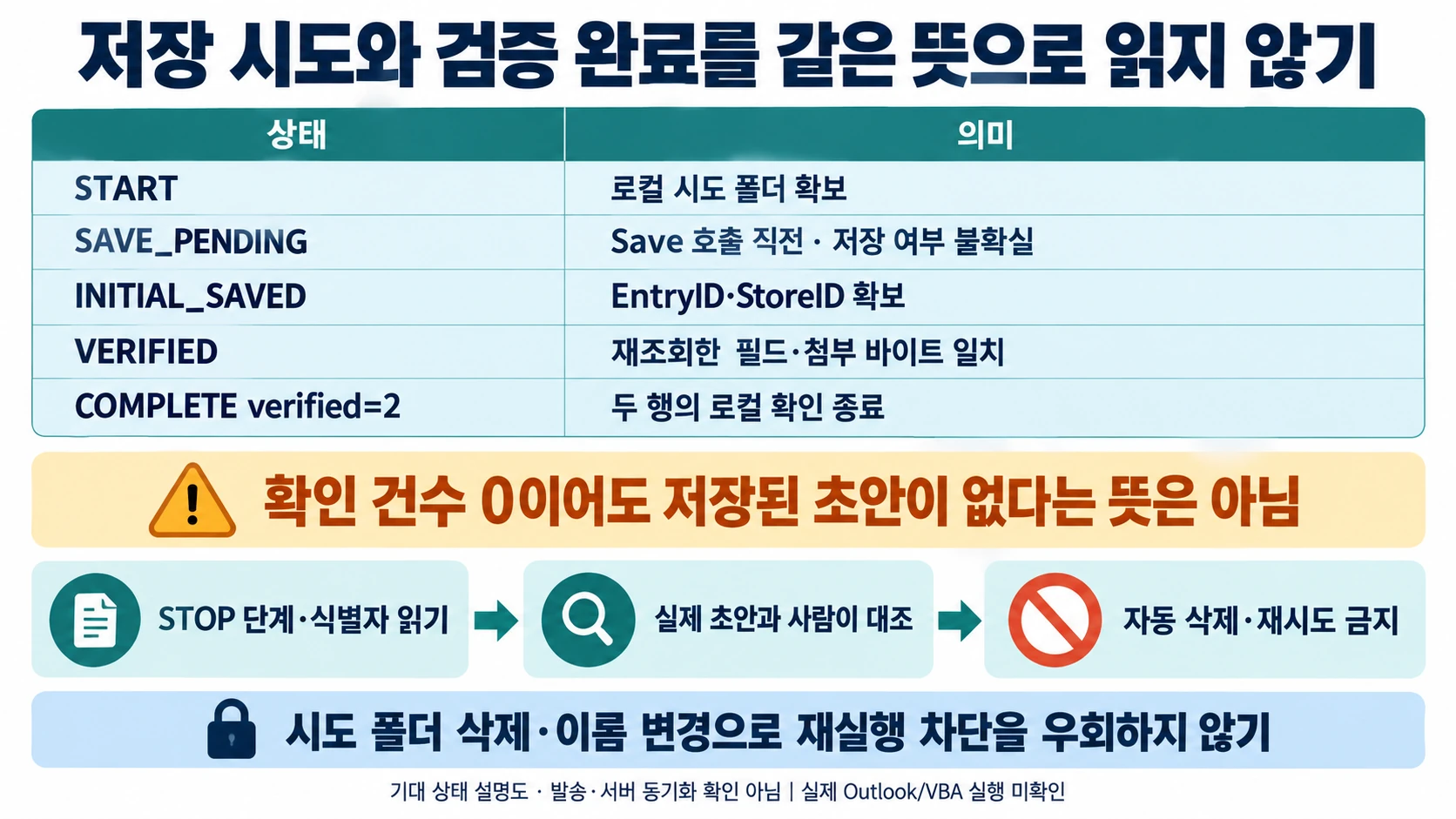
| 시도 기록 | 의미 | 아직 확인되지 않은 점 |
|---|---|---|
| START | 로컬 시도 폴더 확보 | 초안 저장 여부 |
| SAVE_PENDING | 곧 Save를 호출함 | 호출 오류가 나도 저장됐을 가능성 |
| INITIAL_SAVED | EntryID·StoreID 확보 | 첨부와 최종 필드 일치 |
| VERIFIED | 재조회한 항목과 첨부 바이트 일치 | 서버 동기화·메일 전달 |
| COMPLETE verified=2 | 두 행의 로컬 확인 종료 | 발송 성공을 뜻하지 않음 |
GetItemFromID는 유효한 EntryID로 지정한 Outlook 항목을 반환합니다. 재조회에서는 미발송 메일인지, 받는 사람 하나·빈 CC/BCC·제목·본문·첨부 하나가 맞는지 확인합니다. 첨부는 별도의 새로운 readback 파일로 저장해 바이트까지 대조합니다. 같은 이름의 기존 readback 파일을 덮지 않습니다.
초안만 다루는 전체 모듈
PracticeModule.bas를 해당 XLSM 표준 모듈로 가져오고 CreateMailDraftsOnly를 사용합니다. 코드는 Send를 호출하지 않습니다. 자동 전달 기능을 추가하는 방향으로 이 실습을 설명하지 않습니다.
첫 Attribute VB_Name 줄은 BAS 가져오기용 메타데이터입니다. BAS를 가져올 때는 그대로 두고, 코드 창에 직접 붙여넣을 때는 이 첫 줄만 제외합니다.
Attribute VB_Name = "PracticeModule"
Option Explicit

Private Const ATTACHMENT_NAME As String = "attachment.txt"
Private Const ATTACHMENT_TEXT As String = "Synthetic attachment for an Outlook draft. No private data."
Private Const ATTEMPT_NAME As String = "blogops-outlook-practice-attempt"
Private Const MAX_ROWS As Long = 30
Private mBusy As Boolean

Public Sub CreateMailDraftsOnly()
    Dim ws As Worksheet, found As Range
    Dim fso As Object, seen As Object, app As Object, session As Object
    Dim mail As Object, check As Object, recipient As Object, attachment As Object
    Dim lastRow As Long, r As Long, i As Long, n As Long, verified As Long
    Dim inputs() As String, key As String, sourcePath As String
    Dim attemptPath As String, receiptPath As String, stagedPath As String
    Dim entryID As String, storeID As String, bodyText As String, readbackPath As String
    Dim phase As String, message As String, failText As String, logError As String
    Dim attemptOwned As Boolean, saveMayHaveHappened As Boolean

    If mBusy Then
        MsgBox "This module is already running.", vbExclamation
        Exit Sub
    End If
    mBusy = True
    On Error GoTo Failed
    phase = "preflight"
    If InStr(1, Application.OperatingSystem, "Mac", vbTextCompare) > 0 Then
        Err.Raise vbObjectError + 680, , "Windows classic Outlook is required."
    End If
    If Len(ThisWorkbook.Path) = 0 Or ThisWorkbook.FileFormat <> 52 Then
        Err.Raise vbObjectError + 681, , "Save a separate XLSM controller first."
    End If
    Set fso = CreateObject("Scripting.FileSystemObject")
    If Not fso.FolderExists(ThisWorkbook.Path) Then
        Err.Raise vbObjectError + 682, , "Use a writable local practice folder."
    End If
    Set ws = ThisWorkbook.Worksheets("Recipients")
    If CellText(ws.Range("A1")) <> "Email" Or _
       CellText(ws.Range("B1")) <> "Subject" Or _
       CellText(ws.Range("C1")) <> "Attachment" Then
        Err.Raise vbObjectError + 683, , "Expected Email, Subject, Attachment headers."
    End If
    Set found = ws.Range("A:C").Find(What:="*", After:=ws.Range("A1"), _
        LookIn:=xlFormulas, LookAt:=xlPart, SearchOrder:=xlByRows, _
        SearchDirection:=xlPrevious, MatchCase:=False, SearchFormat:=False)
    If found Is Nothing Then Err.Raise vbObjectError + 684, , "Input is empty."
    lastRow = found.Row
    n = lastRow - 1
    If n < 1 Or n > MAX_ROWS Then
        Err.Raise vbObjectError + 685, , "Use 1 to 30 complete synthetic rows."
    End If
    ReDim inputs(1 To n, 1 To 3)
    Set seen = CreateObject("Scripting.Dictionary")
    seen.CompareMode = vbTextCompare
    For r = 2 To lastRow
        i = r - 1
        inputs(i, 1) = Trim$(CellText(ws.Cells(r, 1)))
        inputs(i, 2) = Trim$(CellText(ws.Cells(r, 2)))
        inputs(i, 3) = CellText(ws.Cells(r, 3))
        If Not IsSampleAddress(inputs(i, 1)) Then
            Err.Raise vbObjectError + 686, , "Invalid sample mailbox at row " & CStr(r)
        End If
        If Len(inputs(i, 2)) < 1 Or Len(inputs(i, 2)) > 120 Or _
           HasControlCharacter(inputs(i, 2)) Then
            Err.Raise vbObjectError + 687, , "Invalid subject at row " & CStr(r)
        End If
        If StrComp(inputs(i, 3), ATTACHMENT_NAME, vbBinaryCompare) <> 0 Then
            Err.Raise vbObjectError + 688, , "Only attachment.txt is allowed."
        End If
        key = inputs(i, 1) & vbTab & inputs(i, 2)
        If seen.Exists(key) Then
            Err.Raise vbObjectError + 689, , "Duplicate recipient/subject row."
        End If
        seen.Add key, True
    Next r
    sourcePath = fso.BuildPath(ThisWorkbook.Path, ATTACHMENT_NAME)
    CheckFixtureBytes fso, sourcePath
    attemptPath = fso.BuildPath(ThisWorkbook.Path, ATTEMPT_NAME)
    If fso.FolderExists(attemptPath) Or fso.FileExists(attemptPath) Then
        Err.Raise vbObjectError + 690, , _
            "A previous attempt exists. Inspect its receipt and Outlook drafts before any repeat."
    End If
    If MsgBox("Create " & CStr(n) & " synthetic drafts in the current Outlook profile?" & _
        vbCrLf & "Drafts may sync to that account. Do not press Send." & _
        vbCrLf & "The attempt folder will block blind repeat runs.", _
        vbYesNo + vbQuestion + vbDefaultButton2) <> vbYes Then
        message = "Cancelled before draft creation."
        GoTo Finished
    End If

    phase = "reserve attempt folder"
    fso.CreateFolder attemptPath
    attemptOwned = True
    receiptPath = fso.BuildPath(attemptPath, "receipt.txt")
    WriteReceipt fso, receiptPath, "START " & Format$(Now, "yyyy-mm-dd hh:nn:ss") & _
        " rows=" & CStr(n), True
    stagedPath = fso.BuildPath(attemptPath, ATTACHMENT_NAME)
    WriteFixture fso, stagedPath
    CheckFixtureBytes fso, stagedPath

    phase = "connect to classic Outlook"
    Set app = CreateObject("Outlook.Application")
    Set session = app.GetNamespace("MAPI")
    For i = 1 To n
        r = i + 1
        entryID = ""
        storeID = ""
        phase = "prepare row " & CStr(r)
        bodyText = "Practice draft. Review the recipient and attachment manually." & _
            vbCrLf & "BlogOps practice; worksheet row " & CStr(r) & ". Do not send."
        Set mail = app.CreateItem(0)
        mail.BodyFormat = 1
        Set recipient = mail.Recipients.Add(inputs(i, 1))
        recipient.Type = 1
        mail.Subject = inputs(i, 2)
        mail.Body = bodyText

        phase = "initial save row " & CStr(r)
        WriteReceipt fso, receiptPath, "SAVE_PENDING row=" & CStr(r), False
        saveMayHaveHappened = True
        mail.Save
        entryID = CStr(mail.EntryID)
        storeID = CStr(mail.Parent.StoreID)
        If Len(entryID) = 0 Or Len(storeID) = 0 Then
            Err.Raise vbObjectError + 691, , "Saved item identity is unavailable."
        End If
        WriteReceipt fso, receiptPath, "INITIAL_SAVED row=" & CStr(r) & _
            " EntryID=" & entryID & " StoreID=" & storeID, False

        phase = "attach and save row " & CStr(r)
        CheckFixtureBytes fso, stagedPath
        Set attachment = mail.Attachments.Add(stagedPath, 1)
        mail.Save
        Set attachment = Nothing
        Set recipient = Nothing
        Set mail = Nothing

        phase = "read back row " & CStr(r)
        Set check = session.GetItemFromID(entryID, storeID)
        If check.Class <> 43 Or check.Sent Then
            Err.Raise vbObjectError + 692, , "Saved item is not an unsent mail item."
        End If
        If check.Recipients.Count <> 1 Then
            Err.Raise vbObjectError + 693, , "Expected exactly one recipient."
        End If
        Set recipient = check.Recipients.Item(1)
        If recipient.Type <> 1 Or _
           StrComp(CStr(recipient.Address), inputs(i, 1), vbTextCompare) <> 0 Then
            Err.Raise vbObjectError + 694, , "Recipient readback differs."
        End If
        If Len(CStr(check.CC)) <> 0 Or Len(CStr(check.BCC)) <> 0 Or _
           StrComp(CStr(check.Subject), inputs(i, 2), vbBinaryCompare) <> 0 Then
            Err.Raise vbObjectError + 695, , "Subject or recipient fields differ."
        End If
        If StrComp(NormalizeBody(CStr(check.Body)), NormalizeBody(bodyText), vbBinaryCompare) <> 0 Then
            Err.Raise vbObjectError + 696, , "Body readback differs."
        End If
        If check.Attachments.Count <> 1 Then
            Err.Raise vbObjectError + 697, , "Expected exactly one attachment."
        End If
        Set attachment = check.Attachments.Item(1)
        If StrComp(CStr(attachment.FileName), ATTACHMENT_NAME, vbBinaryCompare) <> 0 Or _
           attachment.Type <> 1 Then
            Err.Raise vbObjectError + 698, , "Attachment identity differs."
        End If
        readbackPath = fso.BuildPath(attemptPath, "readback-row-" & CStr(r) & ".txt")
        If fso.FileExists(readbackPath) Or fso.FolderExists(readbackPath) Then
            Err.Raise vbObjectError + 699, , "Readback path already exists; no overwrite."
        End If
        attachment.SaveAsFile readbackPath
        CheckFixtureBytes fso, readbackPath
        WriteReceipt fso, receiptPath, "VERIFIED row=" & CStr(r) & _
            " EntryID=" & entryID & " StoreID=" & storeID, False
        verified = verified + 1
        Set attachment = Nothing
        Set recipient = Nothing
        Set check = Nothing
    Next i
    WriteReceipt fso, receiptPath, "COMPLETE verified=" & CStr(verified), False
    message = CStr(verified) & " drafts verified and logged." & vbCrLf & _
        "This macro did not call Send. Review Drafts; do not send these examples." & _
        vbCrLf & "Keep the attempt folder: " & attemptPath
    GoTo Finished

Failed:
    failText = Err.Description
    message = "Stopped at " & phase & ": " & failText & vbCrLf & _
        "Verified and logged rows: " & CStr(verified) & "."
    If saveMayHaveHappened Then
        message = message & vbCrLf & "Saved or incomplete drafts may remain. No automatic deletion or retry."
    Else
        message = message & vbCrLf & "This attempt did not reach a draft Save call."
    End If
    If attemptOwned Then
        message = message & vbCrLf & "Keep and inspect: " & attemptPath
        On Error Resume Next
        Err.Clear
        WriteReceipt fso, receiptPath, "STOP phase=" & phase & _
            " verified=" & CStr(verified) & " error=" & failText, False
        If Err.Number <> 0 Then logError = Err.Description
        On Error GoTo 0
        If Len(logError) > 0 Then message = message & vbCrLf & "Receipt update unconfirmed: " & logError
    End If

Finished:
    Set attachment = Nothing
    Set recipient = Nothing
    Set check = Nothing
    Set mail = Nothing
    Set session = Nothing
    Set app = Nothing
    Set seen = Nothing
    Set fso = Nothing
    mBusy = False
    If Len(message) > 0 Then MsgBox message, vbInformation
End Sub

Private Function CellText(ByVal cell As Range) As String
    If cell.HasFormula Or cell.MergeCells Or IsError(cell.Value2) Then
        Err.Raise vbObjectError + 700, , "Formula, merged or error input cell: " & cell.Address
    End If
    If IsEmpty(cell.Value2) Then
        CellText = ""
    ElseIf VarType(cell.Value2) = vbString Then
        CellText = CStr(cell.Value2)
    Else
        Err.Raise vbObjectError + 701, , "Expected literal text: " & cell.Address
    End If
End Function

Private Function HasControlCharacter(ByVal value As String) As Boolean
    Dim i As Long, code As Long
    For i = 1 To Len(value)
        code = AscW(Mid$(value, i, 1))
        If code >= 0 And (code < 32 Or code = 127) Then
            HasControlCharacter = True
            Exit Function
        End If
    Next i
End Function

Private Function IsSampleAddress(ByVal value As String) As Boolean
    Dim parts As Variant, localPart As String, i As Long, code As Long, ch As String
    parts = Split(value, "@")
    If UBound(parts) <> 1 Then Exit Function
    If StrComp(CStr(parts(1)), "example.com", vbTextCompare) <> 0 Then Exit Function
    localPart = CStr(parts(0))
    If Len(localPart) < 1 Or Len(localPart) > 64 Then Exit Function
    If Left$(localPart, 1) = "." Or Right$(localPart, 1) = "." Or _
       InStr(localPart, "..") > 0 Then Exit Function
    For i = 1 To Len(localPart)
        ch = Mid$(localPart, i, 1)
        code = AscW(ch)
        If Not ((code >= 48 And code <= 57) Or (code >= 65 And code <= 90) Or _
                (code >= 97 And code <= 122) Or InStr(1, "._+-", ch, vbBinaryCompare) > 0) Then
            Exit Function
        End If
    Next i
    IsSampleAddress = True
End Function

Private Function NormalizeBody(ByVal value As String) As String
    value = Replace(value, vbCrLf, vbLf)
    value = Replace(value, vbCr, vbLf)
    Do While Len(value) > 0
        If Right$(value, 1) <> vbLf Then Exit Do
        value = Left$(value, Len(value) - 1)
    Loop
    NormalizeBody = value
End Function

Private Sub CheckFixtureBytes(ByVal fso As Object, ByVal filePath As String)
    Dim handle As Integer, opened As Boolean, data() As Byte, expected As String
    Dim i As Long, number As Long, description As String
    On Error GoTo Failed
    expected = ATTACHMENT_TEXT & vbLf
    If Not fso.FileExists(filePath) Then
        Err.Raise vbObjectError + 702, , "Missing synthetic attachment."
    End If
    handle = FreeFile
    Open filePath For Binary Access Read Lock Write As #handle
    opened = True
    If LOF(handle) <> Len(expected) Then
        Err.Raise vbObjectError + 703, , "Synthetic attachment byte length differs."
    End If
    ReDim data(0 To Len(expected) - 1)
    Get #handle, , data
    For i = 0 To UBound(data)
        If data(i) <> AscW(Mid$(expected, i + 1, 1)) Then
            Err.Raise vbObjectError + 704, , "Synthetic attachment bytes differ."
        End If
    Next i
    Close #handle
    opened = False
    Exit Sub
Failed:
    number = Err.Number
    description = Err.Description
    On Error Resume Next
    If opened Then Close #handle
    On Error GoTo 0
    Err.Raise number, "CheckFixtureBytes", description
End Sub

Private Sub WriteFixture(ByVal fso As Object, ByVal filePath As String)
    Dim stream As Object, number As Long, description As String
    On Error GoTo Failed
    Set stream = fso.CreateTextFile(filePath, False, False)
    stream.Write ATTACHMENT_TEXT & vbLf
    stream.Close
    Set stream = Nothing
    Exit Sub
Failed:
    number = Err.Number
    description = Err.Description
    On Error Resume Next
    If Not stream Is Nothing Then stream.Close
    On Error GoTo 0
    Err.Raise number, "WriteFixture", description
End Sub

Private Sub WriteReceipt(ByVal fso As Object, ByVal filePath As String, _
                         ByVal value As String, ByVal first As Boolean)
    Dim stream As Object, number As Long, description As String
    On Error GoTo Failed
    If first Then
        Set stream = fso.CreateTextFile(filePath, False, True)
    Else
        Set stream = fso.OpenTextFile(filePath, 8, False, -1)
    End If
    stream.WriteLine value
    stream.Close
    Set stream = Nothing
    Exit Sub
Failed:
    number = Err.Number
    description = Err.Description
    On Error Resume Next
    If Not stream Is Nothing Then stream.Close
    On Error GoTo 0
    Err.Raise number, "WriteReceipt", description
End Sub
초안을 확인할 Windows 실습 순서
-
Windows 클래식 Outlook을 사용하는 별도 연습 환경이 필요합니다. 실제 실행은 아직 검증하지 않았습니다.
-
practice-68.xlsx를 outlook-draft-demo.xlsm으로 저장하고 attachment.txt 원본 바이트를 같은 폴더에 둡니다.
-
PracticeModule.bas를 가져옵니다. 실제 주소·개인 첨부로 바꾸지 않습니다.
-
CreateMailDraftsOnly는 초안 저장 전 기본 아니오 확인창을 표시합니다. Send 호출은 없습니다.
-
실제 실행 시 sample1@example.com/Practice A와 sample2@example.com/Practice B의 미발송 초안·첨부·receipt.txt를 대조합니다.
-
부분 실패 또는 기존 시도 폴더가 있으면 자동 삭제·재시도하지 않습니다. Python verification.json은 실제 Outlook 영수증이 아닙니다.
검증 결과와 사용할 환경에서의 확인
Python 검사는 실제 Recipients의 두 행과 attachment.txt의 정확한 바이트를 읽고, 허용 주소·중복·잘못된 경로·첨부 변형을 검사했습니다. 임시 폴더에서는 이미 확보한 시도 경로를 두 번째 실행이 덮지 못하는 규칙을 검산합니다. 저장 중단 모델에서 SAVE_PENDING을 VERIFIED로 해석하지 않는 것도 확인합니다. 이 기록들은 참조 테스트이며 Outlook에서 생성된 receipt.txt가 아닙니다.
독자가 Windows 연습 환경에서 실행한다면 먼저 두 초안만 예상된다는 것을 확인합니다. 완료 후 초안함에서 sample1@example.com/Practice A와 sample2@example.com/Practice B를 각각 열어 미발송 상태와 첨부를 확인하고, 시도 폴더의 실제 receipt.txt와 대조합니다. 수신·서버 동기화 여부는 이 코드의 완료 조건에 포함되지 않습니다.
중간 실패는 흔적을 남긴 채 멈춥니다
Outlook을 열기 전 첨부 바이트 불일치로 중단됐다면, ZIP에서 attachment.txt를 새 연습 폴더로 다시 복사해 입력을 복구합니다. 텍스트 편집기의 개행 변환·BOM 추가를 제거하려고 파일을 재편집하기보다 제공된 정확한 바이트와 비교하세요. 이미 시도 폴더가 만들어진 실패라면 이 입력 복구만으로 재실행 자격이 생기지는 않습니다.
첫 Save 직전부터는 오류가 났어도 초안이 남았을 수 있습니다. 검증 완료 수가 0이라는 이유로 아무것도 저장되지 않았다고 판단하면 안 됩니다. STOP 기록의 단계, INITIAL_SAVED의 식별자, 실제 초안함을 함께 확인합니다. 코드가 생성 초안을 자동 삭제하거나 재시도하지 않는 이유입니다.
재실행 차단 메시지가 나오면 시도 폴더를 지워 우회하지 않습니다. 이전 결과가 확인되지 않은 상태에서 새 시도 폴더 이름만 만드는 것도 같은 중복 위험을 숨깁니다. 연습을 다시 하려면 이전 흔적과 초안을 먼저 사람이 대조하고 별도 실습 건으로 정리해야 합니다.
적용 한계
이 코드는 메일 전달, 서버 측 중복 제거, Outlook 강제 종료 뒤 완전 복구를 보장하지 않습니다. 시도 경로는 로컬 보수적 차단 장치입니다. 실제 COM 호출, 프로필·보안 대화상자, StoreID 재조회와 첨부 저장은 아직 실행 검증하지 않았습니다. 업무 주소·개인 첨부로 바꾸기 전에 별도 요구와 테스트가 필요합니다.
공식 자료
MailItem.Save method (Outlook)
Attachments.Add method (Outlook)
NameSpace.GetItemFromID method (Outlook)
출처 원문 수집일: S1 2026-09-24; S2 2026-09-24; S3 2026-09-24.
작성자 소개
