SQLite의 NULL과 빈 문자열을 CSV로 내보낼 때 구분하기
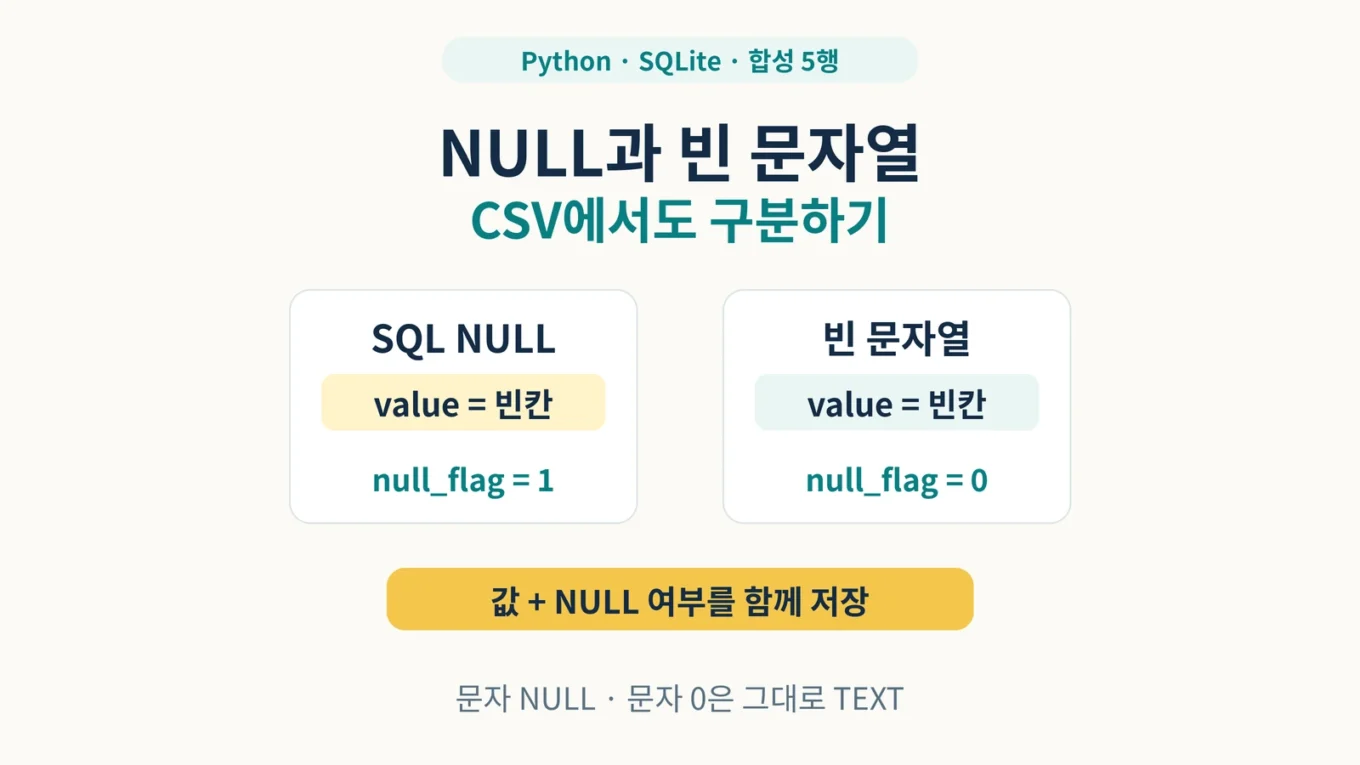
SQLite에서 NULL과 빈 문자열 ''은 서로 다른 값입니다. 그런데 Python의 기본 csv.writer로 내보내면 둘 다 CSV의 빈 필드가 됩니다. 나중에 이 CSV만 읽어서는 어느 행이 원래 NULL이었는지 알아낼 수 없습니다.
이 글에서는 값을 담는 value와 NULL 여부를 담는 null_flag를 함께 저장합니다. 합성 데이터 5행을 새 CSV로 내보내고 새 SQLite DB에 복원한 뒤, ID별 값과 저장 타입까지 비교합니다. 문자 NULL과 문자 0도 그대로 남는지 확인합니다.
SQLite NULL·빈 문자열 왕복 실습 ZIP 다운로드에는 전체 코드, 합성 원본 DB를 만드는 명령, 기대 CSV, 실패 연습 자료, 자동 시험이 들어 있습니다. 조사·실행 검수일은 2026년 10월 11일이며 실제 검수 환경은 Linux의 CPython 3.12.14, SQLite 3.53.1입니다. 사이트의 표시 게시일과 실제 조사·검수일을 구분해 기록합니다.
적용 범위: 제공한 합성 DB의 null_demo 표에서 NULL 또는 TEXT인 값만 다룹니다. INTEGER·REAL·BLOB은 거부합니다. 운영 DB, 동시 쓰기와 WAL 파일, Excel에서 열고 다시 저장하는 과정, 대용량 성능은 이 실습의 검증 범위에 포함하지 않습니다.
1. 두 값이 CSV에서 합쳐지는 이유
SQL NULL은 값이 없음을 나타냅니다. 빈 문자열은 길이가 0인 TEXT입니다. Python의 sqlite3 기본 변환에서 NULL은 None으로, TEXT는 str로 읽힙니다. 따라서 빈 문자열은 ""로 읽히지만 NULL과 같아지지 않습니다.
문제는 다음 저장 단계에서 생깁니다. 기본 csv.writer는 None을 빈 문자열로 기록합니다. 빈 문자열도 빈 필드로 기록되므로 구분 정보가 사라집니다. CSV 파일을 만들었다는 사실만으로 원래 값을 되돌릴 수 있다는 보장은 없습니다.
Python에서 읽은 값     기본 CSV의 value 필드
None                  빈 필드
""                    빈 필드
"NULL"                NULL
"0" 0None을 문자 NULL로 바꾸는 방식도 조심해야 합니다. 원래 값이 문자 NULL인 행과 충돌하기 때문입니다. 이 실습은 특별한 문자열을 결측값으로 추측하지 않고 별도 열에 상태를 기록합니다.
2. value와 null_flag의 약속 정하기
null_flag=1: 원래 SQL NULL입니다.value는 반드시 빈 필드여야 합니다.null_flag=0: 원래 TEXT입니다.value를 문자열 그대로 복원합니다. 빈 문자열도 허용합니다.0과1외의 flag, 빈 flag,1인데 값이 들어 있는 행은 오류로 처리합니다.
예를 들어 value=NULL, null_flag=0은 문자 NULL입니다. value=0, null_flag=0은 문자 0입니다. 값 자체를 보고 NULL이나 숫자로 다시 해석하지 않습니다.
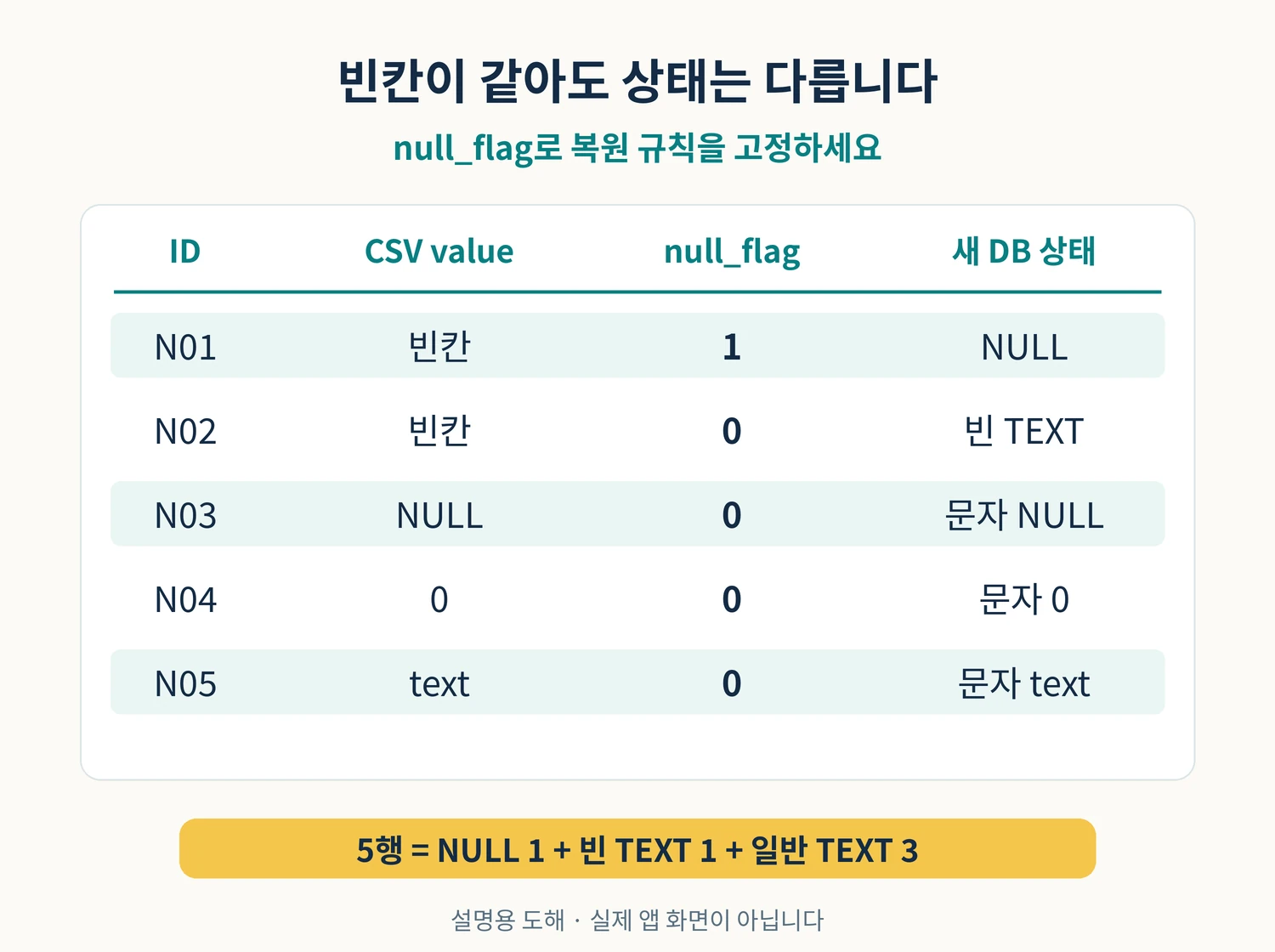
| ID | 원본 값 | flag | 복원 typeof |
|---|---|---|---|
| N01 | SQL NULL | 1 | null |
| N02 | 빈 문자열 | 0 | text |
| N03 | 문자 NULL | 0 | text |
| N04 | 문자 0 | 0 | text |
| N05 | 문자 text | 0 | text |
3. 압축을 풀고 새 파일로 실습하기
ZIP을 새 폴더에 풀고 그 안의 p53_sqlite_null_csv 폴더를 터미널의 작업 폴더로 지정하세요. 아래 명령은 같은 폴더에서 실행합니다. 외부 패키지는 필요하지 않습니다. 검수에서는 python3를 사용했습니다. Windows에서 같은 인터프리터를 실행할 때는 환경에 맞게 py -3 등으로 바꾸되, Windows 화면 조작은 별도로 검증하지 않았습니다.
첫 명령이 합성 원본 source.db를 만듭니다. 새 결과는 exported.csv, restored.db입니다. 원본을 만드는 명령도 기존 파일을 덮어쓰지 않으며 결과 파일이 이미 있으면 실행을 멈춥니다. 반복 실습은 새 폴더나 새 파일명을 쓰세요. 기존 결과를 자동으로 지우거나 덮어쓰지 않습니다.
python3 null_roundtrip.py create-demo source.db
python3 null_roundtrip.py export source.db exported.csv
python3 null_roundtrip.py restore exported.csv restored.db
python3 null_roundtrip.py verify source.db restored.db
기대 CSV에는 머리글을 제외하고 5행이 있습니다. 아래에서 N01과 N02의 value는 둘 다 빈 필드지만 마지막 열이 다릅니다.
id,value,null_flag
N01,,1
N02,,0
N03,NULL,0
N04,0,0
N05,text,0
마지막 검증은 두 DB를 ID 기준으로 비교합니다. 전체 5행, NULL 1개, 빈 TEXT 1개, 그 외 TEXT 3개가 같아야 합니다. 특히 N04의 typeof(value)가 text인지 확인합니다. 문자 0을 INTEGER 0으로 바꾸면 값이 비슷하게 보여도 검증을 통과하지 못합니다.
OK create-demo: 5 rows in new source database
OK export: 5 rows; source_sha256=<원본 파일의 SHA256>
OK restore: 5 rows committed in one transaction to new database
OK verify: 5 rows = 1 NULL + 1 empty TEXT + 3 nonempty TEXT; values/types match by id
DB 파일의 SHA256끼리 같아야 하는 것은 아닙니다. 새 DB는 별도로 만들어지므로 파일 내부 배치가 달라도 됩니다. 원본의 SHA256은 실행 전후에 변하지 않았는지 확인하고, 왕복 결과는 ID·값·NULL 여부·타입으로 검사합니다.
4. 코드에서 상태를 보존하는 지점
내보내기는 조회한 값이 None이면 빈 value와 flag 1을 기록하고, 문자열이면 그 문자열과 flag 0을 기록합니다. 복원은 flag만 보고 None 또는 문자열을 선택합니다. value == "NULL"이나 int(value) 같은 추측은 하지 않습니다.
                writer.writerow([
                    identifier,
                    '' if value_type == 'null' else value,
                    '1' if value_type == 'null' else '0',
                ])

                rows.append((identifier, None if flag == '1' else value))
입력 CSV는 UTF-8로 엄격하게 읽습니다. 머리글은 id,value,null_flag 순서와 개수가 정확해야 하고, 데이터 행도 3열이어야 합니다. ID는 비어 있으면 안 되며 중복도 거부합니다. 이 작은 예제는 필드당 131,072문자 제한을 내보내기와 읽기에 동일하게 적용합니다. CSV 파서가 감지한 따옴표 오류와 잘못된 UTF-8도 성공 결과로 취급하지 않습니다.
원본 DB는 file: URI에 mode=ro를 붙여 연결합니다. 존재하지 않는 DB를 자동 생성하지 않습니다. 복원 대상은 새 경로를 독점 생성하고 명시적으로 트랜잭션을 시작해 표 생성과 행 입력을 함께 처리합니다. 실패 시 롤백하고 연결을 닫습니다. 복원 중 오류가 나면 이 실행이 만든 불완전한 파일을 정리하며 기존 파일은 건드리지 않습니다.
CSV와 새 DB가 파일 여러 개에 걸쳐 하나의 원자적 작업으로 만들어지는 구조는 아닙니다. 갑작스러운 프로세스 종료, 디스크 고장, 다른 프로그램의 동시 변경까지 복구한다고 보장하지 않습니다. 이 예제의 보호 범위는 제공 합성 입력과 정상적으로 감지한 오류에 한정됩니다.
전체 실행 코드 펼치기: null_roundtrip.py
#!/usr/bin/env python3
"""Five-row SQLite NULL/TEXT CSV exercise. Python standard library only.

This is a teaching example for a closed, synthetic database, not a backup
tool for a live database. Read README.md before using the commands.
"""
import argparse
import csv
import hashlib
import os
from pathlib import Path
import sqlite3
import sys

HEADER = ['id', 'value', 'null_flag']
DEMO_ROWS = [
    ('N01', None),
    ('N02', ''),
    ('N03', 'NULL'),
    ('N04', '0'),
    ('N05', 'text'),
]
ROW_COUNT = 5
MAX_FIELD_CHARS = 131_072  # Same bound for export and strict CSV import.
DEMO_SUMMARY = {'rows': 5, 'null': 1, 'empty_text': 1, 'nonempty_text': 3}
SCHEMA = 'CREATE TABLE null_demo (id TEXT PRIMARY KEY NOT NULL, value)'


class ExerciseError(ValueError):
    """Input does not satisfy this small exercise's contract."""


def _source_path(path):
    path = Path(path).resolve()
    if not path.is_file():
        raise ExerciseError(f'source file does not exist or is not a file: {path}')
    return path


def _new_output(path):
    path = Path(path).absolute()
    # lexists also rejects a dangling symlink, which must not be replaced.
    if os.path.lexists(path):
        raise ExerciseError(f'output already exists; choose a new path: {path}')
    return path


def _different_paths(first, second):
    first, second = Path(first), Path(second)
    same = first.resolve() == second.resolve()
    if first.exists() and second.exists():
        same = same or os.path.samefile(first, second)
    if same:
        raise ExerciseError('source and destination must be different paths')


def _sha256(path):
    digest = hashlib.sha256()
    with Path(path).open('rb') as handle:
        for chunk in iter(lambda: handle.read(1024 * 1024), b''):
            digest.update(chunk)
    return digest.hexdigest()


def _snapshot(path):
    """Read the five rows through mode=ro and check NULL/TEXT storage types."""
    path = _source_path(path)
    before = _sha256(path)
    connection = sqlite3.connect(path.as_uri() + '?mode=ro', uri=True)
    try:
        records = connection.execute(
            'SELECT id, value, typeof(value), typeof(id) '
            'FROM null_demo ORDER BY id'
        ).fetchall()
    finally:
        connection.close()
    if _sha256(path) != before:
        raise ExerciseError('database SHA-256 changed during read; stop the exercise')
    if len(records) != ROW_COUNT:
        raise ExerciseError(f'exactly {ROW_COUNT} rows required; got {len(records)}')
    seen = set()
    rows = []
    for identifier, value, value_type, id_type in records:
        if id_type != 'text' or not isinstance(identifier, str) or not identifier:
            raise ExerciseError('id must be a nonempty TEXT value')
        if identifier in seen:
            raise ExerciseError(f'duplicate id: {identifier!r}')
        seen.add(identifier)
        if value_type not in ('null', 'text'):
            raise ExerciseError(
                f'{identifier}: unsupported SQLite type {value_type}; '
                'INTEGER, REAL and BLOB are outside this NULL/TEXT exercise'
            )
        if len(identifier) > MAX_FIELD_CHARS or (
            value_type == 'text' and len(value) > MAX_FIELD_CHARS
        ):
            raise ExerciseError(f'{identifier[:40]}: CSV fields may contain at most {MAX_FIELD_CHARS} characters')
        rows.append((identifier, value, value_type))
    return rows, before


def _write_new_database(target, rows):
    """Exclusive new file; explicit transaction covers schema and all inserts."""
    target = _new_output(target)
    try:
        descriptor = os.open(target, os.O_WRONLY | os.O_CREAT | os.O_EXCL, 0o600)
    except FileExistsError as error:
        raise ExerciseError(f'output already exists: {target}') from error
    os.close(descriptor)
    try:
        # mode=rw requires the file reserved above; it does not create another file.
        connection = sqlite3.connect(target.resolve().as_uri() + '?mode=rw', uri=True)
        try:
            connection.execute('BEGIN')
            connection.execute(SCHEMA)
            for identifier, value in rows:
                # Binding None creates SQL NULL. Binding str keeps even '0' TEXT
                # because value has no declared type / no numeric affinity.
                connection.execute(
                    'INSERT INTO null_demo (id, value) VALUES (?, ?)',
                    (identifier, value),
                )
            connection.commit()
        except BaseException:
            connection.rollback()
            raise
        finally:
            connection.close()
    except BaseException:
        # Only the new file reserved by this invocation is removed.
        # The exercise assumes nobody concurrently changes these paths.
        target.unlink(missing_ok=True)
        raise


def create_demo(source):
    """Create a NEW synthetic source database; never overwrite one."""
    _write_new_database(source, DEMO_ROWS)


def export_csv(source, target):
    """Export NULL as empty+1, TEXT as its exact value+0; source is read-only."""
    _different_paths(source, target)
    target = _new_output(target)
    rows, source_sha = _snapshot(source)
    created = False
    try:
        with target.open('x', encoding='utf-8', errors='strict', newline='') as handle:
            created = True
            writer = csv.writer(handle, lineterminator='\n')
            writer.writerow(HEADER)
            for identifier, value, value_type in rows:
                writer.writerow([
                    identifier,
                    '' if value_type == 'null' else value,
                    '1' if value_type == 'null' else '0',
                ])
        if _sha256(_source_path(source)) != source_sha:
            raise ExerciseError('source SHA-256 changed during export; stop the exercise')
    except BaseException:
        if created:
            target.unlink(missing_ok=True)
        raise
    return source_sha


def _read_csv(source):
    rows = []
    seen = set()
    previous_limit = csv.field_size_limit(MAX_FIELD_CHARS)
    try:
        with source.open('r', encoding='utf-8', errors='strict', newline='') as handle:
            reader = csv.reader(handle, strict=True)
            if next(reader, None) != HEADER:
                raise ExerciseError('CSV header must be exactly id,value,null_flag in that order')
            for record in reader:
                if len(record) != len(HEADER):
                    raise ExerciseError(f'CSV record ending at line {reader.line_num}: exactly 3 fields required')
                identifier, value, flag = record
                if not identifier or identifier in seen:
                    raise ExerciseError(f'CSV id must be nonempty and unique: {identifier!r}')
                seen.add(identifier)
                if flag not in ('0', '1'):
                    raise ExerciseError(f'{identifier}: null_flag must be exactly 0 or 1')
                if flag == '1' and value != '':
                    raise ExerciseError(f'{identifier}: null_flag=1 requires an empty value field')
                rows.append((identifier, None if flag == '1' else value))
    except (UnicodeError, csv.Error) as error:
        raise ExerciseError(f'invalid UTF-8 or malformed CSV: {error}') from error
    finally:
        csv.field_size_limit(previous_limit)
    if len(rows) != ROW_COUNT:
        raise ExerciseError(f'exactly {ROW_COUNT} CSV data rows required; got {len(rows)}')
    return rows


def restore_csv(source, target):
    """Validate all CSV first, then restore into a NEW database transaction."""
    _different_paths(source, target)
    source = _source_path(source)
    target = _new_output(target)
    rows = _read_csv(source)
    _write_new_database(target, rows)


def verify(source, restored):
    """Compare id -> (value, typeof(value)), then enforce the demo's counts."""
    _different_paths(source, restored)
    source_rows, _ = _snapshot(source)
    restored_rows, _ = _snapshot(restored)
    expected = {identifier: (value, kind) for identifier, value, kind in source_rows}
    actual = {identifier: (value, kind) for identifier, value, kind in restored_rows}
    if expected.keys() != actual.keys():
        raise ExerciseError('source and restored id sets differ')
    for identifier in sorted(expected):
        if expected[identifier] != actual[identifier]:
            raise ExerciseError(
                f'{identifier}: value/type mismatch: '
                f'source={expected[identifier]!r}; restored={actual[identifier]!r}'
            )
    summary = {
        'rows': len(restored_rows),
        'null': sum(kind == 'null' for _, _, kind in restored_rows),
        'empty_text': sum(kind == 'text' and value == '' for _, value, kind in restored_rows),
        'nonempty_text': sum(kind == 'text' and value != '' for _, value, kind in restored_rows),
    }
    if summary != DEMO_SUMMARY:
        raise ExerciseError(f'exercise counts differ: expected {DEMO_SUMMARY}; got {summary}')
    return summary


def main(argv=None):
    parser = argparse.ArgumentParser(description=__doc__)
    commands = parser.add_subparsers(dest='command', required=True)
    create = commands.add_parser('create-demo', help='create a new five-row source database')
    create.add_argument('source', type=Path)
    for name, help_text in (
        ('export', 'read-only source database to a new UTF-8 CSV'),
        ('restore', 'validated CSV to a new database'),
        ('verify', 'read-only comparison of two databases'),
    ):
        command = commands.add_parser(name, help=help_text)
        command.add_argument('source', type=Path)
        command.add_argument('target', type=Path)
    args = parser.parse_args(argv)
    try:
        if args.command == 'create-demo':
            create_demo(args.source)
            print('OK create-demo: 5 rows in new source database')
        elif args.command == 'export':
            source_sha = export_csv(args.source, args.target)
            print(f'OK export: 5 rows; source_sha256={source_sha}')
        elif args.command == 'restore':
            restore_csv(args.source, args.target)
            print('OK restore: 5 rows committed in one transaction to new database')
        else:
            verify(args.source, args.target)
            print('OK verify: 5 rows = 1 NULL + 1 empty TEXT + 3 nonempty TEXT; values/types match by id')
    except (OSError, ValueError, sqlite3.Error, csv.Error) as error:
        print(f'ERROR: {error}', file=sys.stderr)
        return 2
    return 0


if __name__ == '__main__':
    raise SystemExit(main())
5. 잘못된 flag를 거부하고 다시 실행하기
동봉한 실패 CSV는 규칙을 어긴 행을 포함합니다. 아래 명령은 성공하면 안 됩니다. 오류 메시지를 확인하고, 실패용 DB가 남아 있지 않은지 살펴보세요. 원본 DB와 앞에서 만든 정상 결과는 그대로 유지되어야 합니다.
python3 null_roundtrip.py restore negative_cases/flag_2.csv rejected_flag2.db
python3 null_roundtrip.py restore negative_cases/flag_1_nonempty.csv rejected_nonempty.db
첫 파일은 flag가 2여서 거부하고, 두 번째 파일은 flag 1인데 value에 문자 NULL이 들어 있어 거부합니다. flag 1은 NULL을 뜻하므로 value를 함께 적는 모순된 행을 받아들이지 않습니다.
실패를 고치려면 원본 값을 확인한 뒤 CSV의 flag와 value를 함께 수정해야 합니다. 문자 NULL을 보존하려던 행이면 flag 0, 실제 NULL이던 행이면 빈 value와 flag 1을 사용합니다. 기존 결과명이 있다는 오류는 새로운 결과명을 지정해 해결하세요. 원본이 없다는 오류가 나면 ZIP의 합성 파일 경로와 작업 폴더부터 확인합니다.
수정 후에는 복원만 끝내지 말고 verify까지 실행합니다. 검증이 다른 행이나 타입을 알려 주면 복원된 DB를 완료본으로 쓰지 마세요. 새 경로에서 올바른 CSV로 다시 복원하고 동일한 비교를 통과하는지 확인합니다.
6. 자동 시험으로 확인한 것과 한계
검수에서는 정상 5행 왕복뿐 아니라 잘못된 flag, 모순된 NULL 행, 머리글·열 수 오류, 중복 ID, UTF-8 오류, 기존 출력, 같은 경로, 누락 원본과 저장 실패를 확인했습니다. 복원 트랜잭션 도중 실패했을 때 롤백되는지, 문자 NULL을 NULL로 바꾸거나 문자 0을 정수로 바꾼 잘못된 DB를 비교가 찾아내는지도 시험했습니다.
python3 -m unittest discover -vSQLite 백업 전체를 대신하는 예제는 아닙니다. 원본 표의 인덱스·트리거·모든 제약·다른 표를 CSV로 옮기지 않습니다. ID와 value를 새 실습 표로 재구성하는 데 목적이 있습니다. 일반 숫자와 BLOB까지 보존하려면 별도 타입 계약이 필요하므로 이 코드의 허용 범위를 임의로 넓히지 마세요.
또한 CSV를 Excel 등 다른 앱에서 열고 다시 저장하면 문자열, 머리글, 인코딩이 달라질 수 있습니다. 이 글은 그런 중간 편집을 검증하지 않았습니다. 전달받는 프로그램도 같은 null_flag 규칙을 구현해야 상태가 유지됩니다.
7. Python 3.12의 QUOTE_NOTNULL에 주의하기
Python 3.12에는 csv.QUOTE_NOTNULL과 csv.QUOTE_STRINGS가 추가되었습니다. 다만 3.12 공식 문서는 이 두 옵션이 reader 동작에 영향을 주지 않는 버그가 있고 3.13에서 수정되었다고 안내합니다. 이 글에서 실제 시험한 3.12 환경에서는 해당 옵션만으로 NULL과 빈 문자열을 왕복 보존한다고 설명하지 않습니다.
이 실습의 flag 열은 CSV 인용 방식과 별개로 복원 규칙을 드러냅니다. 다른 Python 버전이나 프로그램으로 옮기더라도 규칙 자체를 합의하고 입력 검증을 유지하는 것이 중요합니다.
8. 이어서 볼 글과 공식 문서
- CSV의 결측 상태와 문자 0을 구분하는 실습: CSV에서 시작한 결측 토큰과 사유를 다룹니다. 이번 글은 DB의 NULL을 CSV로 내보냈다가 복원하는 과정입니다.
- CSV를 검증한 뒤 SQLite에 적재하기: 입력 검증과 적재 제약을 함께 확인할 때 참고하세요.
- Python 3.12 csv.writer 공식 문서: None을 빈 문자열로 기록하는 기본 동작과 비가역성
- Python 3.12 QUOTE_NOTNULL 공식 문서: 3.12 reader 버그와 3.13 수정 안내
- SQLite와 Python의 기본 타입 변환
- sqlite3 읽기 전용 URI와 트랜잭션 제어
핵심은 빈칸을 보고 원래 상태를 짐작하지 않는 것입니다. 값과 NULL 여부를 함께 저장하고, 복원한 뒤 ID별 값과 타입을 비교하면 NULL과 빈 문자열, 문자 NULL, 문자 0을 서로 구분해 유지할 수 있습니다.
작성자 소개
