폴더 파일 목록을 깊이별로 기록하고 못 본 범위 구분하기
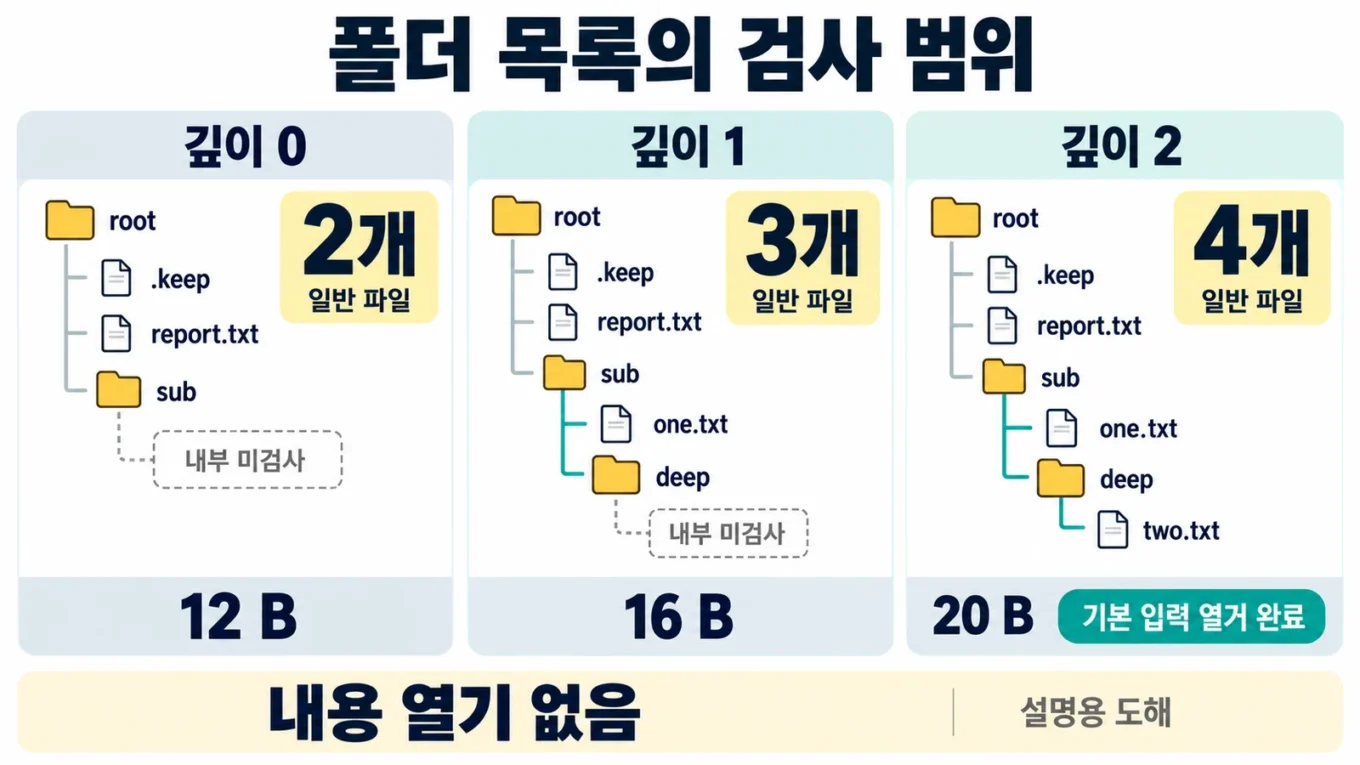
폴더에 파일이 몇 개 있는지 기록할 때는 하위 폴더를 어디까지 봤는지 함께 남겨야 합니다. 이 실습의 같은 가상 폴더에서 깊이 0은 일반 파일 2개, 깊이 1은 3개, 깊이 2는 4개를 기록합니다. 깊이 제한 때문에 안 본 하위 범위와 조회 실패로 못 본 범위를 따로 구분합니다.
Python의 파일 시스템 메타데이터로 상대 경로·종류·일반 파일의 크기를 수집하고, 검사 root 밖에 새 JSON을 저장합니다. 원본 파일 내용을 열거나 해시를 계산하지 않으며 파일·폴더를 이동하거나 삭제하는 기능도 없습니다. 이 목록으로 확인하는 것은 지정한 깊이의 경로와 조회 범위입니다.
1 root 바로 아래를 깊이 0으로 정합니다
실습 ZIP 다운로드를 새
빈 폴더에 풀고 README.txt가 있는 최상위 위치에서 터미널을 엽니다. 기본
입력은 fixtures/root입니다. 실제 업무 폴더를 섞지 않고 이
가상 입력부터 확인합니다.
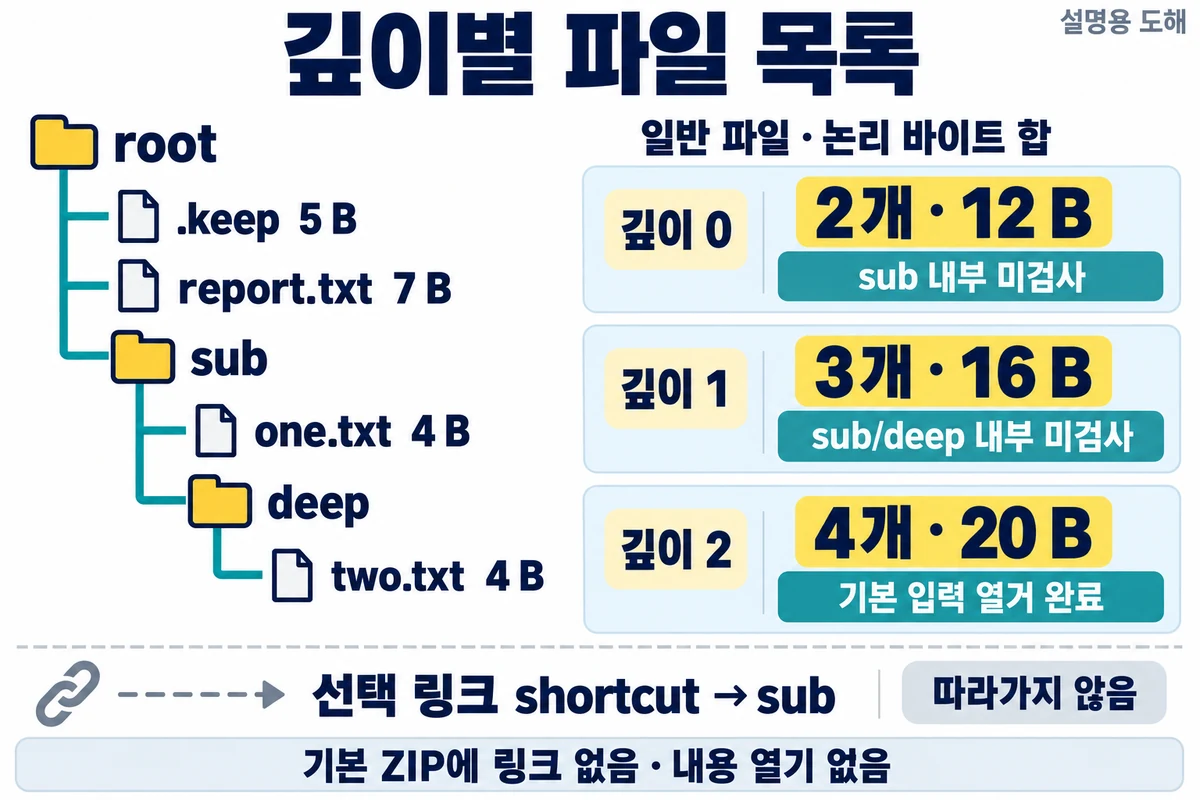
| 상대 경로 | 종류 | 파일 크기 | 경로가 나타나는 깊이 |
|---|---|---|---|
.keep |
일반 파일 | 5바이트 | 0 |
report.txt |
일반 파일 | 7바이트 | 0 |
sub |
폴더 | 합계에 넣지 않음 | 0 |
sub/one.txt |
일반 파일 | 4바이트 | 1 |
sub/deep |
폴더 | 합계에 넣지 않음 | 1 |
sub/deep/two.txt |
일반 파일 | 4바이트 | 2 |
파일 내용은 검산용 짧은 문자열이며 .keep은
keep 뒤 줄바꿈 하나, report.txt는
report 뒤 줄바꿈 하나, 나머지는 각각 one과
two 뒤 줄바꿈 하나입니다. 목록 프로그램은 이 내용을 읽지
않고 lstat()의 크기만 사용합니다.
깊이 0은 root의 바로 아래 항목을 열거합니다. 여기서
sub라는 폴더의 존재는 기록하지만 내부는 보지 않습니다. 깊이
1은 sub 내부까지, 깊이 2는 sub/deep 내부까지
열거합니다. 폴더 자신의 행이 나타나는 깊이와 그 안의 항목을 볼 깊이는 한
단계 차이가 납니다.
| 지정 깊이 | 일반 파일 수 | 기록한 파일 크기 합 | 깊이 제한으로 안 본 내부 |
|---|---|---|---|
| 0 | 2 | 12바이트 | sub 내부 |
| 1 | 3 | 16바이트 | sub/deep 내부 |
| 2 | 4 | 20바이트 | 이 가상 입력에서는 없음 |
숨김 항목은 포함합니다. 점으로 시작하는 이름도 제외하지 않고 Windows
숨김 속성으로도 필터링하지 않습니다. .과 ..는
디렉터리 항목으로 넣지 않습니다. 정렬은 상대 경로 문자열의 Unicode
코드포인트 순서이며 탐색기의 언어별 정렬과 같다고 가정하지 않습니다.
파일 크기 합은 목록에 기록한 일반 파일의 논리적 바이트 합입니다. 폴더 크기나 링크 크기를 더하지 않으며 실제 디스크 점유량·압축 효과·희소 파일·하드 링크의 중복 점유량을 계산하는 값도 아닙니다.

2 세 깊이를 서로 다른 새 보고서에 저장합니다
Python 3.12 표준 라이브러리만 사용하므로 별도 패키지 설치가 필요하지 않습니다. ZIP을 푼 최상위 위치에서 다음을 실행합니다.
python --version
python code/inventory.py fixtures/root --depth 0 --output inventory-depth0.json
python code/inventory.py fixtures/root --depth 1 --output inventory-depth1.json
python code/inventory.py fixtures/root --depth 2 --output inventory-depth2.json
python -m unittest discover -s tests -v
python 대신 python3만 등록돼 있다면 모든
명령의 실행 이름을 python3으로 바꿉니다. Python 버전이
3.12인지 먼저 확인하세요. 보고서는 fixtures/root 바깥인
현재 위치에 생기며 화면에도 같은 JSON이 출력됩니다. 기존 보고서는
덮어쓰지 않습니다.
깊이 1 결과를 다시 저장하려면 아래처럼 새 이름을 지정합니다. 입력이 그대로라면 처음 보고서와 같은 값이어야 합니다.
python code/inventory.py fixtures/root --depth 1 --output inventory-depth1-02.json
종료 코드 0은 지정한 깊이와 링크 미추적 정책 안에서 조회 오류가
없었다는 뜻입니다. 부분 조회 오류는 1, 잘못된 인수·root·출력 경로 또는
저장 오류는 2입니다. --depth를 생략하면 1입니다. 쉘의 출력
리다이렉션 대신 --output을 사용하면 프로그램의 기존 파일
보호 검사를 거칩니다.
3 범위 완료와 전체 하위 열거를 따로 읽습니다
다음은 기본 입력의 깊이 1 JSON 전체입니다. ZIP의
expected/depth1.json과 같습니다. 깊이 0·2 전체 기대값은
각각 expected/depth0.json,
expected/depth2.json에 있습니다.
{
  "schema_version": 1,
  "root": ".",
  "scope": {
    "max_depth": 1,
    "depth_zero": "root_children",
    "hidden_entries": "included",
    "links": "not_followed",
    "max_entries": 2000,
    "sorting": "relative_path_unicode_codepoint"
  },
  "scope_complete": true,
  "whole_tree_enumerated": false,
  "entries": [
    {
      "path": ".keep",
      "depth": 0,
      "kind": "file",
      "size_bytes": 5,
      "state": "recorded"
    },
    {
      "path": "report.txt",
      "depth": 0,
      "kind": "file",
      "size_bytes": 7,
      "state": "recorded"
    },
    {
      "path": "sub",
      "depth": 0,
      "kind": "directory",
      "size_bytes": null,
      "state": "recorded"
    },
    {
      "path": "sub/deep",
      "depth": 1,
      "kind": "directory",
      "size_bytes": null,
      "state": "recorded"
    },
    {
      "path": "sub/one.txt",
      "depth": 1,
      "kind": "file",
      "size_bytes": 4,
      "state": "recorded"
    }
  ],
  "directories": [
    {
      "path": ".",
      "children_depth": 0,
      "state": "listed"
    },
    {
      "path": "sub",
      "children_depth": 1,
      "state": "listed"
    },
    {
      "path": "sub/deep",
      "children_depth": 2,
      "state": "depth_limit"
    }
  ],
  "deferred": [
    {
      "path": "sub/deep",
      "reason": "depth_limit"
    }
  ],
  "errors": [],
  "summary": {
    "files": 3,
    "file_bytes": 16,
    "directories": 2,
    "links": 0,
    "special": 0,
    "unknown": 0,
    "deferred": 1,
    "errors": 0
  },
  "content_read": false
}
root의 .은 명령에 지정한 검사 root를
뜻합니다. entries의 경로는 모두 그 root 기준 상대 경로이며
/를 사용합니다. 보고서를 다른 곳으로 옮겨도 경로의 기준은
원래 검사한 폴더입니다. size_bytes는 일반 파일에만 숫자를
기록하고 다른 종류나 메타데이터 실패에는 null을 둡니다.
scope_complete=true와 deferred 한 건은
동시에 나타날 수 있습니다. 여기서는 깊이 1까지 조회가 끝났지만
sub/deep 내부는 처음 정한 정책에 따라 검사하지 않았습니다.
따라서 whole_tree_enumerated=false입니다. 보류 한 건을
“오류 없음이니 폴더 전체를 다 봤다”로 바꾸어 읽지 않습니다.
깊이 2의 기본 입력은 deferred=[],
errors=[], whole_tree_enumerated=true입니다.
이는 이 가상 트리의 디렉터리 항목 열거가 끝났다는 뜻이며 파일 내용을
확인했다는 뜻은 아닙니다. 모든 결과의 content_read는
false입니다.
4 빈 폴더와 검사하지 못한 폴더를 구분합니다
directories는 폴더 내부를 얼마나 열거했는지 보여 줍니다.
root 자신은 path=".", root 바로 아래 항목의 깊이는
children_depth=0입니다.
| 표시 | 의미 | 다음 확인 |
|---|---|---|
empty |
그 폴더를 정상 열거했고 항목이 없었음 | 오류 없이 빈 폴더로 기록 |
listed |
그 폴더를 정상 열거했고 항목이 있었음 | 행 목록과 지정 깊이를 대조 |
depth_limit |
설정한 깊이를 넘어서 내부를 열거하지 않음 | 필요하면 더 깊은 값으로 새 보고서 작성 |
read_failed |
열거 또는 사전 경로 검사가 실패함 | errors의 경로·이유를 확인 |
entry_limit |
전체 항목 한도 때문에 내부를 보류함 | 더 작은 실습 root로 검사 범위를 나누기 |
changed_or_unavailable |
처음 관찰 후 변경되거나 재조회가 실패함 | 변경 작업이 멈춘 뒤 새 보고서로 재검사 |
read_failed를 빈 폴더로 적지 않습니다.
PermissionError는 permission_denied, 다른
운영체제 조회 오류는 io_error로 구분합니다. 항목 이름은
보였지만 그 항목의 메타데이터를 못 읽으면 entries에
kind="unknown", state="metadata_failed"를
남깁니다. 오류가 하나라도 있으면 scope_complete=false이고
파일 수는 부분 관찰값으로 취급합니다.
한 디렉터리를 열거하는 도중 오류나 항목 한도가 발생하면 그 디렉터리에서 먼저 나온 이름 일부를 정상 결과로 채택하지 않습니다. 원래 열거 순서가 정해져 있지 않기 때문입니다. 앞서 정상 조회한 다른 폴더의 행은 남기고 실패 범위를 따로 기록합니다.
5 링크를 따라가지 않고 경로 자체를 기록합니다
기본 ZIP에는 심볼릭 링크가 들어 있지 않습니다. 압축 해제 도구와
OS마다 링크 처리 방식이 달라, 실습 폴더를 만드는
setup_fixture.py에서 선택적으로 생성합니다. 다음 명령은
현재 위치 바로 아래의 아직 없는 practice_link 폴더를 만들고
shortcut → sub 링크를 추가합니다.
python setup_fixture.py --root practice_link --with-link
python code/inventory.py practice_link --depth 1 --output inventory-link-depth1.json
첫 명령이 성공했을 때만 두 번째 명령을 실행합니다. Linux의 이 선택
입력은 깊이 1에서 일반 파일 3개와 링크 1개를 기록합니다.
shortcut/one.txt 같은 행은 생기지 않습니다. 링크 자체는
kind="symlink", state="not_followed",
size_bytes=null이고 whole_tree_enumerated는
false입니다. 링크를 따라간 트리는 열거하지 않았기
때문입니다.
Windows의 메타데이터에서 연결 지점 태그를 관찰하면
junction, 그 밖의 재분석 지점 속성을 관찰하면
reparse_point로 구분해 내부 순회를 보류합니다. 이 예제의
junction 표시는 MOUNT_POINT 태그 기준이며 연결 지점의 세부
형식을 인증하는 값은 아닙니다. 이러한 종류가 root 자체나 root·출력
경로의 상위 구성요소에서 확인되면 실행을 거부합니다. ..
경로도 허용하지 않습니다.
Python 3.12의 Windows lstat 동작 설명은 심볼릭 링크·directory junction 같은 이름 대체 재분석 지점과 달리, 다른 종류의 재분석 지점은 운영체제가 해석할 수 있다고 명시합니다. 이 코드는 반환된 메타데이터로 순회 여부를 정하며 Windows의 모든 재분석 기능을 조회 전에 차단하는 보안 도구는 아닙니다.
Python
3.12의 os.symlink 설명은 Windows에서 링크 생성에 권한 제약이 있을 수
있다고 안내합니다. 링크 생성이 실패했다면 기본
fixtures/root로 실습을 이어 가세요. 이 글에서는 Windows의
링크 생성·연결 지점·권한 동작을 실제 실행하지 않았습니다.
6 ZIP과 같은 전체 목록 코드
다음은 ZIP의 code/inventory.py 전체 코드입니다. 원본
파일을 여는 부분은 없으며 open("x")는 root 밖의 새 출력에만
사용합니다. setup_fixture.py는 가상 입력을 만드는 별도 준비
도구이고 목록 실행과 구분합니다.
Path.lstat 공식 문서는 링크 대상 대신 링크 자체의 정보를 반환하는 동작을 설명합니다. 종류는 stat의 파일 종류 검사로 나눕니다. Windows의 속성과 태그는 os.stat_result의 재분석 지점 정보를 사용합니다.
"""List bounded filesystem metadata without opening source file contents."""
import argparse
import json
import os
from pathlib import Path
import stat
import sys

MAX_DEPTH = 20
MAX_ENTRIES = 2000
LINK_KINDS = {"symlink", "junction", "reparse_point"}


class EntryLimit(ValueError):
    pass


class ScanChanged(ValueError):
    pass


def kind_of(info):
    if stat.S_ISLNK(info.st_mode):
        return "symlink"
    attributes = getattr(info, "st_file_attributes", 0)
    if attributes & getattr(stat, "FILE_ATTRIBUTE_REPARSE_POINT", 0x400):
        tag = getattr(info, "st_reparse_tag", 0)
        if tag == getattr(stat, "IO_REPARSE_TAG_MOUNT_POINT", 0xA0000003):
            return "junction"
        return "reparse_point"
    if stat.S_ISDIR(info.st_mode):
        return "directory"
    if stat.S_ISREG(info.st_mode):
        return "file"
    return "special"


def absolute_path(value):
    path = Path(value).absolute()
    if ".." in path.parts:
        raise ValueError("경로에 .. 대신 실제 폴더 이름을 사용하세요")
    return path


def checked_path(value):
    """Check existing components from the filesystem anchor downwards."""
    path = absolute_path(value)
    current = Path(path.anchor)
    for part in path.parts[1:]:
        current = current / part
        if kind_of(current.lstat()) in LINK_KINDS:
            raise ValueError("링크·연결 지점·재분석 지점 경로를 거부합니다")
    return path


def signature(info):
    return (info.st_dev, info.st_ino, info.st_mode, info.st_size,
            info.st_mtime_ns, info.st_ctime_ns,
            getattr(info, "st_file_attributes", 0),
            getattr(info, "st_reparse_tag", 0))


def scan(root, max_depth=1, max_entries=MAX_ENTRIES):
    if type(max_depth) is not int or not 0 <= max_depth <= MAX_DEPTH:
        raise ValueError("깊이는 0~20 정수여야 합니다")
    if type(max_entries) is not int or not 1 <= max_entries <= MAX_ENTRIES:
        raise ValueError("항목 한도는 1~2000 정수여야 합니다")
    root = checked_path(root)
    root_info = root.lstat()
    if kind_of(root_info) != "directory":
        raise ValueError("검사 root는 일반 폴더여야 합니다")
    entries, directories, deferred, errors = [], [], [], []
    snapshots = {root: signature(root_info)}
    rows = {}
    observed = 0
    budget_exhausted = False

    def label(path):
        return path.relative_to(root).as_posix()

    def failure(path, error):
        reason = ("permission_denied" if isinstance(error, PermissionError)
                  else "entry_limit" if isinstance(error, EntryLimit)
                  else "changed" if isinstance(error, ScanChanged)
                  else "path_rejected" if isinstance(error, ValueError)
                  else "io_error")
        errors.append({"path": label(path), "reason": reason,
                       "error_type": type(error).__name__})

    pending = [(root, 0)]
    while pending:
        directory, child_depth = pending.pop()
        record = {"path": label(directory), "children_depth": child_depth,
                  "state": "pending"}
        directories.append(record)
        if child_depth > max_depth:
            record["state"] = "depth_limit"
            deferred.append({"path": label(directory), "reason": "depth_limit"})
            continue
        if budget_exhausted:
            record["state"] = "entry_limit"
            deferred.append({"path": label(directory), "reason": "entry_limit"})
            continue
        try:
            checked_path(directory)
            if signature(directory.lstat()) != snapshots[directory]:
                raise ScanChanged("폴더 메타데이터가 바뀌었습니다")
            names = []
            with os.scandir(directory) as iterator:
                for entry in iterator:
                    observed += 1
                    if observed > max_entries:
                        raise EntryLimit("전체 열거 항목 한도를 초과했습니다")
                    names.append(entry.name)
            record["state"] = "listed" if names else "empty"
        except (OSError, ValueError) as error:
            record["state"] = "entry_limit" if isinstance(error, EntryLimit) else "read_failed"
            if isinstance(error, EntryLimit):
                budget_exhausted = True
            deferred.append({"path": label(directory), "reason": record["state"]})
            failure(directory, error)
            continue
        children = []
        for name in sorted(names):
            path = directory / name
            row = {"path": label(path), "depth": child_depth, "kind": "unknown",
                   "size_bytes": None, "state": "metadata_failed"}
            entries.append(row)
            rows[path] = row
            try:
                checked_path(path.parent)
                info = path.lstat()
                kind = kind_of(info)
                snapshots[path] = signature(info)
                row.update(kind=kind, size_bytes=info.st_size if kind == "file" else None,
                           state="not_followed" if kind in LINK_KINDS else
                                 "special_not_opened" if kind == "special" else "recorded")
                if kind == "directory":
                    children.append((path, child_depth + 1))
            except (OSError, ValueError) as error:
                failure(path, error)
        pending.extend(reversed(children))

    # A metadata recheck can detect some changes, but is not an atomic snapshot.
    for path, previous in snapshots.items():
        try:
            checked_path(path.parent)
            if signature(path.lstat()) != previous:
                raise ScanChanged("관찰 후 메타데이터가 바뀌었습니다")
        except (OSError, ValueError) as error:
            failure(path, error)
            if path in rows:
                rows[path]["state"] = "changed_or_unavailable"
            for record in directories:
                if record["path"] == label(path) and record["state"] in {"listed", "empty"}:
                    record["state"] = "changed_or_unavailable"

    entries.sort(key=lambda row: row["path"])
    directories.sort(key=lambda row: row["path"])
    deferred.sort(key=lambda row: (row["path"], row["reason"]))
    errors.sort(key=lambda row: (row["path"], row["reason"]))
    file_rows = [row for row in entries if row["kind"] == "file"]
    links = sum(row["kind"] in LINK_KINDS for row in entries)
    return {
        "schema_version": 1, "root": ".",
        "scope": {"max_depth": max_depth, "depth_zero": "root_children",
                  "hidden_entries": "included", "links": "not_followed",
                  "max_entries": max_entries, "sorting": "relative_path_unicode_codepoint"},
        "scope_complete": not errors,
        "whole_tree_enumerated": not errors and not deferred and links == 0,
        "entries": entries, "directories": directories,
        "deferred": deferred, "errors": errors,
        "summary": {"files": len(file_rows),
                    "file_bytes": sum(row["size_bytes"] for row in file_rows),
                    "directories": sum(row["kind"] == "directory" for row in entries),
                    "links": links, "special": sum(row["kind"] == "special" for row in entries),
                    "unknown": sum(row["kind"] == "unknown" for row in entries),
                    "deferred": len(deferred), "errors": len(errors)},
        "content_read": False,
    }


def report_text(report):
    return json.dumps(report, ensure_ascii=True, indent=2) + "\n"


def run(root, depth, output):
    root = checked_path(root)
    target = absolute_path(output)
    checked_path(target.parent)
    if target.is_relative_to(root):
        raise ValueError("출력은 검사 root 밖에 저장하세요")
    if target.suffix != ".json":
        raise ValueError("출력은 새 .json 파일이어야 합니다")
    if os.path.lexists(target):
        raise ValueError("기존 출력 보존: 새 파일 이름을 지정하세요")
    report = scan(root, depth)
    # Recheck the destination parent. x refuses an existing leaf at creation.
    checked_path(target.parent)
    with target.open("x", encoding="utf-8", newline="\n") as stream:
        stream.write(report_text(report))
    return report


def main(argv=None):
    parser = argparse.ArgumentParser(description="내용을 열지 않는 깊이별 파일 목록")
    parser.add_argument("root", help="직접 만든 연습 폴더")
    parser.add_argument("--depth", type=int, default=1, help="0~20; 기본 1")
    parser.add_argument("--output", required=True, help="root 밖의 새 .json 경로")
    args = parser.parse_args(argv)
    try:
        report = run(args.root, args.depth, args.output)
        sys.stdout.write(report_text(report))
        return 0 if report["scope_complete"] else 1
    except (OSError, ValueError) as error:
        print("ERROR " + type(error).__name__ + ": " + str(error), file=sys.stderr)
        return 2


if __name__ == "__main__":
    raise SystemExit(main())
max_depth는 0~20, 전체 열거 항목은 최대 2,000개입니다.
항목 한도는 일반 파일뿐 아니라 폴더·링크·특수 파일·메타데이터 실패
항목의 이름도 포함합니다. 하위 폴더마다 2,000개씩 새로 허용하는 방식이
아닙니다. 한도 초과를 알아내기 위해 이름 하나를 추가로 확인한 뒤
중단하므로 이름 조회는 최대 2,001개이며, 그 추가 이름을 결과 행에 넣지
않습니다.
os.scandir
공식 문서에 따르면 항목 순서는 임의이며 열거 중 추가·삭제된 항목의
포함 여부도 정해져 있지 않습니다. 이 코드는 한도 안의 이름을 모아
정렬하고 with로 열거기를 닫습니다. 상대 경로의
/ 표기는 PurePath.as_posix와
맞춥니다.
출력 생성에는 open의 x 모드를 사용합니다. 검사 이후 같은 출력 이름이 먼저 생겨도 그 기존 파일을 덮어쓰지 않습니다. 다만 저장 도중 디스크 오류가 발생하면 이번에 만들기 시작한 JSON이 불완전하게 남을 수 있으므로, 종료 코드 2인 출력을 정상 보고서로 채택하지 않습니다.
7 오류를 고친 뒤 새 이름으로 다시 검사합니다
- root가 없거나 파일인 경우: ZIP을 푼 위치와
fixtures/root경로를 확인합니다. 파일 경로를 폴더처럼 넣지 않습니다 - 음수 깊이 또는 20 초과: 0~20의 정수로 다시 지정하고, 지금 필요한 하위 범위부터 정합니다
- 출력이 이미 있는 경우: 기존 보고서를 보존하고
inventory-depth1-02.json처럼 새 이름을 지정합니다 - 출력이 root 안에 있거나 부모 폴더가 없는 경우:
존재하는 일반 부모 폴더에서 root 밖의 새
.json경로를 지정합니다 - 링크가 포함된 root·부모 경로: 실제로 조회하려는 일반 폴더의 경로를 확인합니다. 링크를 통과하도록 옵션을 바꾸는 기능은 없습니다
- permission_denied 또는 io_error: 해당 경로는 미검사로 남깁니다. 접근 가능한 실습 경로를 확인한 뒤 새 보고서로 재실행합니다
- entry_limit: 작은 하위 폴더를 새 root로 지정해 범위를 나눕니다. 새 root를 쓰면 상대 경로의 기준도 바뀝니다
- changed: 다른 작업의 추가·수정·이동이 멈춘 상태에서 다시 실행합니다. 오류가 있는 보고서의 합계를 최종 목록으로 사용하지 않습니다
메타데이터를 처음 관찰한 뒤 한 번 더 조회하여 크기·시각·종류·식별자 등의 차이를 찾습니다. 이 검사는 일부 변경을 발견하지만 한 순간의 일관된 스냅샷을 만들지는 않습니다. 파일 내용의 정상 여부, 복사 완료, 악의적인 경로 교체, 조회와 재조회 사이의 모든 변경을 보장하지 않습니다. 읽기 전용은 원본 내용·경로를 쓰거나 바꾸는 코드가 없다는 뜻이며 OS가 관리하는 접근시각까지 고정한다는 뜻은 아닙니다.
실제 검증 환경은 CPython 3.12.14, Linux 6.18.44, x86_64입니다. 격리한 가상 폴더에서 자동시험 40개가 통과했고 건너뛴 시험은 없습니다. 깊이별 2·3·4개와 상대 경로·크기, 기존 출력 보존·새 이름 재실행, 링크·FIFO 미개방, 빈 폴더, 실제 POSIX 권한거부, 스캔 중 파일·폴더 변경을 확인했습니다. Windows junction·기타 재분석 지점 분류는 메타데이터를 만든 모의시험입니다. 권한거부 모의시험도 실제 POSIX 권한거부 시험과 별도로 포함합니다.
ZIP에는 전체 코드, 링크 없는 기본 fixture, 선택적 setup 도구, 깊이별 전체 기대 JSON, unittest, 실행 환경·독자용 결과 기록, 파일별 SHA-256 목록이 들어 있습니다. SHA-256 목록은 내려받은 실습 패키지의 파일 확인용이며 목록 프로그램이 검사 root의 파일 내용을 해시한다는 뜻은 아닙니다.
작성자 소개
