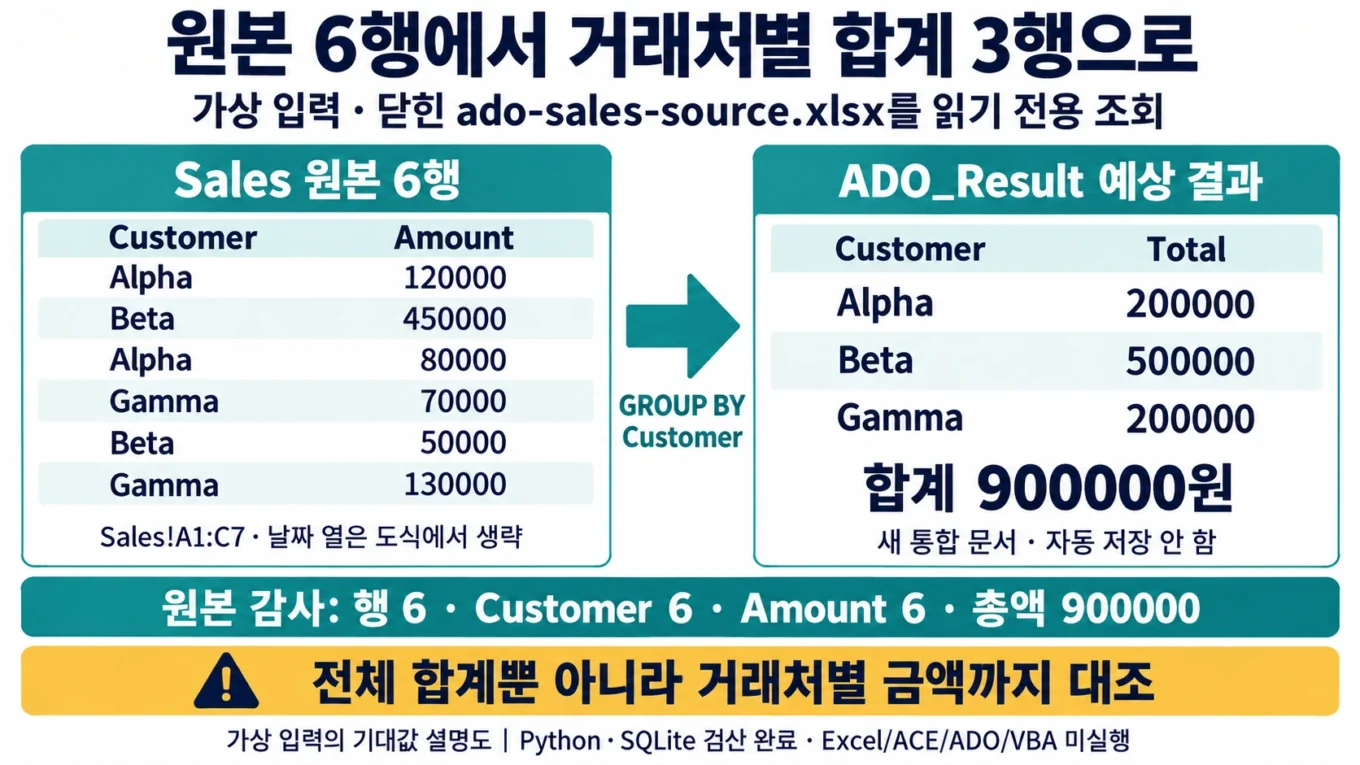
Excel VBA ADO 조회: 거래처별 합계와 원본 6행을 함께 대조하기
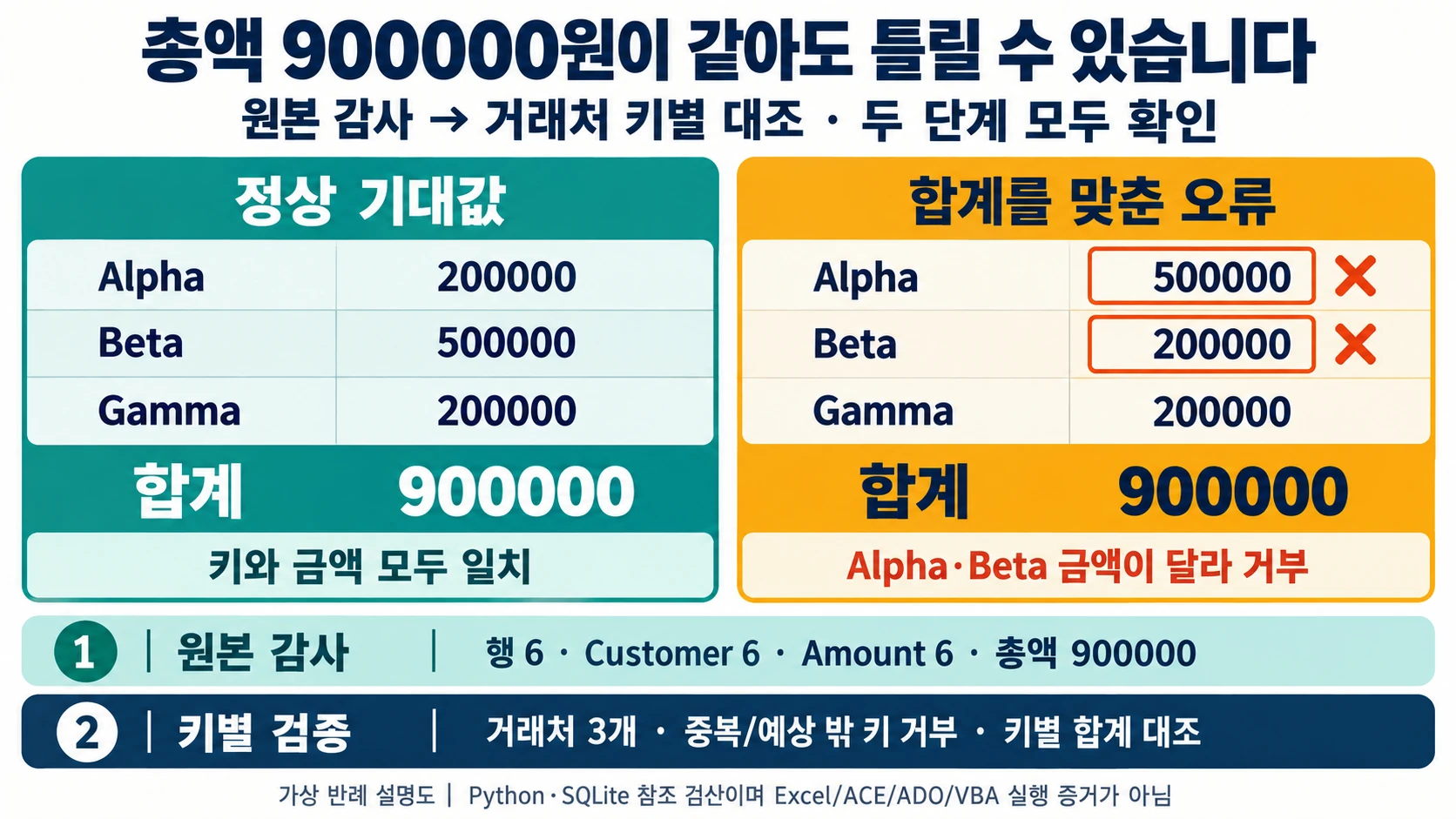
전체 합계가 900000원이면 SQL 집계가 맞았을까요? Alpha와 Beta의 합계를 서로 바꿔도 전체 합계는 같습니다. 이번 예제는 닫힌 로컬 Excel 파일을 읽고 거래처 키별 정답까지 확인한 다음 새 결과 통합 문서를 만드는 연습입니다.
외부 데이터베이스 서버나 로그인 정보는 쓰지 않습니다. Python의 메모리 SQLite에서 같은 가상 행의 SQL 결과를 독립 확인했지만, Windows의 ACE 공급자나 Excel VBA ADO는 실행하지 않았습니다. SQLite 검산을 ACE 호환성 확인으로 표시하지 않습니다.
원본과 제어 파일을 분리합니다
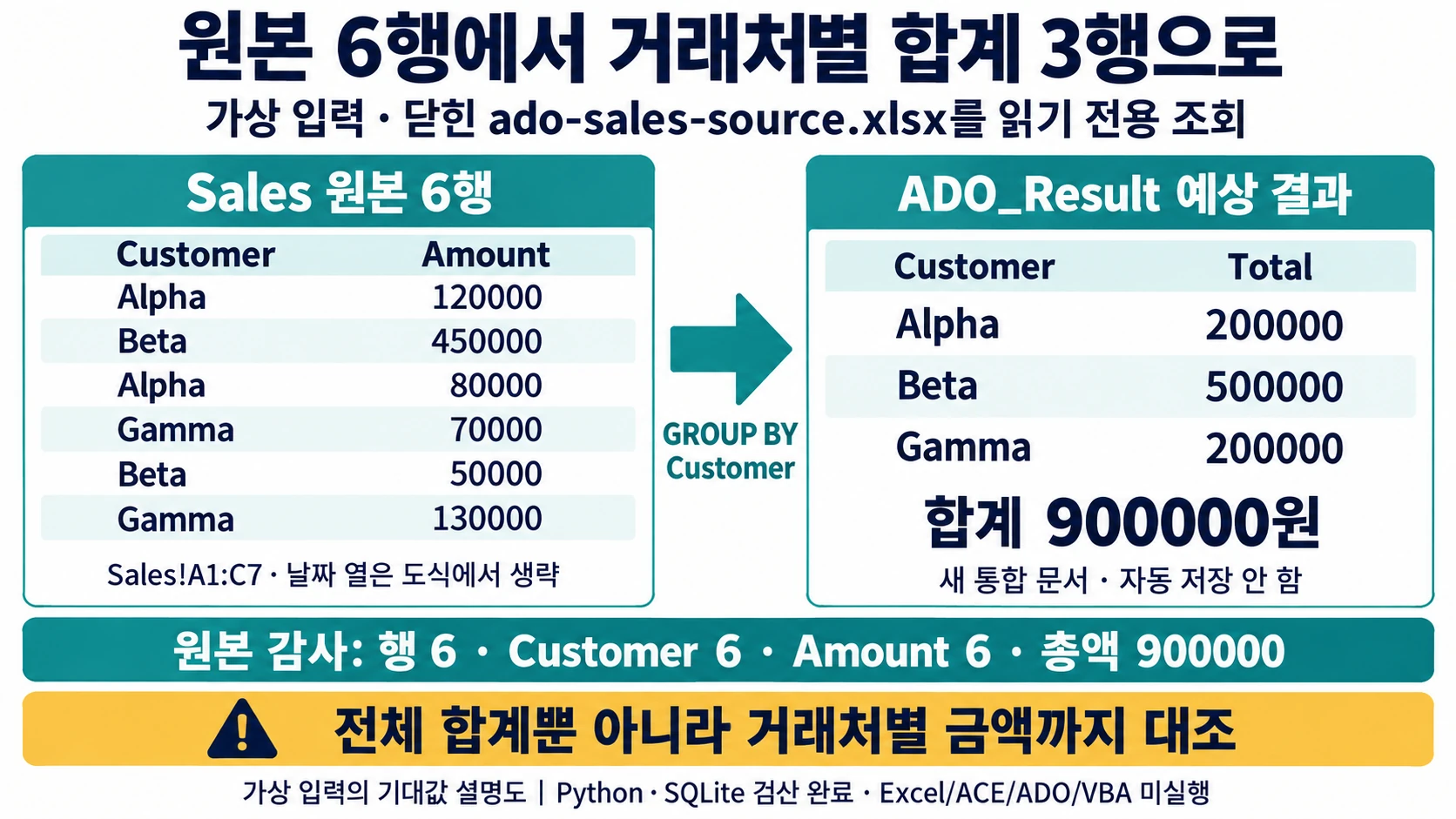
ZIP의 ado-sales-source.xlsx는 읽을 원본이며 Sales!A1:C7에 다음 6건이 있습니다. practice-67.xlsx는 VBA를 넣을 제어 파일의 출발점입니다. 별도 ado-controller.xlsm으로 저장하고 같은 연습 폴더에 두세요. 원본 파일은 Excel에서 닫아 둡니다. Data 시트는 같은 입력을 살펴보는 자료이며 코드의 조회 대상은 파일 이름이 고정된 ado-sales-source.xlsx입니다.
| Customer | Date | Amount |
|---|---|---|
| Alpha | 2026-08-01 | 120000 |
| Beta | 2026-08-02 | 450000 |
| Alpha | 2026-08-03 | 80000 |
| Gamma | 2026-08-04 | 70000 |
| Beta | 2026-08-05 | 50000 |
| Gamma | 2026-08-06 | 130000 |
원본 행 수 6, 비어 있지 않은 Customer 6, 비어 있지 않은 Amount 6, 총액 900000이 첫 검산입니다. 다음 집계는 Alpha 200000, Beta 500000, Gamma 200000의 세 행이어야 합니다. 날짜는 가상 입력을 식별하는 필드이며 이 SQL은 날짜 변환이나 기간 필터를 검증하지 않습니다.
두 쿼리를 쓰는 이유
SELECT COUNT(*) AS [SourceRows], COUNT([Customer]) AS [CustomerRows], COUNT([Amount]) AS [AmountRows], SUM([Amount]) AS [GrandTotal] FROM [Sales$];

SELECT [Customer], SUM([Amount]) AS [Total] FROM [Sales$] GROUP BY [Customer] ORDER BY [Customer];
집계만 보면 비어 있는 금액이 누락된 것을 놓칠 수 있습니다. 그래서 먼저 COUNT 비교로 전체 행 수와 Customer·Amount의 null이 아닌 값 개수를 확인하고, 집계 결과에서는 키 중복·예상하지 않은 거래처·키별 금액·전체 합계를 다시 검사합니다. Alpha 500000, Beta 200000으로 뒤바뀐 결과는 900000이어도 거부합니다. 이 검증기는 이 고정 실습에 맞춘 것이므로 실제 거래처를 추가하려면 예상값 계약도 함께 바꿔야 합니다.
Windows와 공급자 확인은 별도입니다
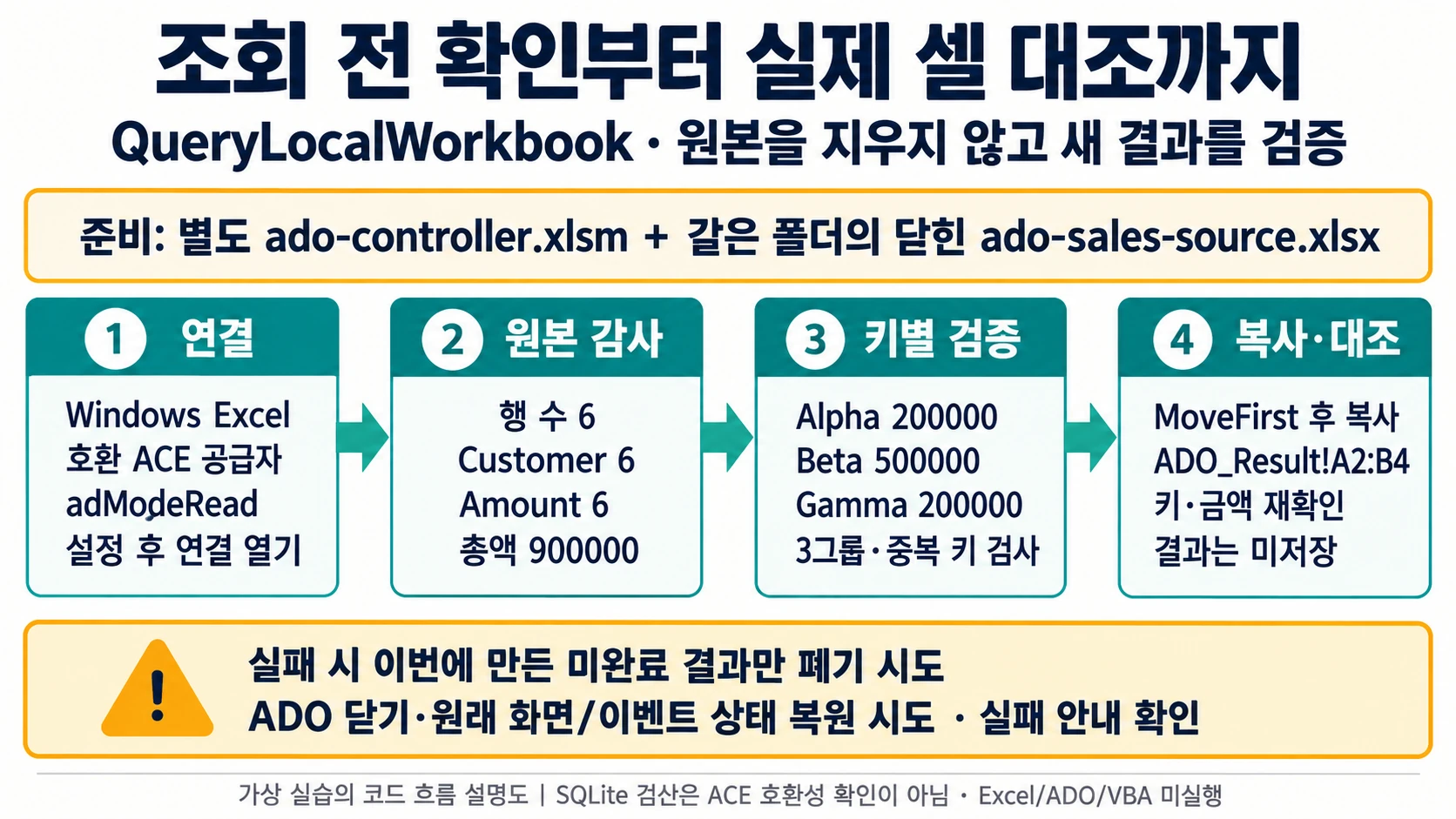
ADO 연결에는 공급자와 데이터 원본에 맞는 연결 문자열이 필요합니다. 예제는 Windows Excel과 호환되는 Microsoft ACE OLE DB 12.0 공급자를 전제로 하며 코드가 이를 설치하지 않습니다. Excel 비트 수·공급자 설치 여부는 사용할 환경에서 확인해야 합니다. macOS에서는 이 코드를 실행한 검증을 제공하지 않습니다.
Mode 속성은 Connection이 닫혀 있을 때만 설정할 수 있습니다. 그래서 adModeRead를 지정한 다음 연결을 엽니다. IMEX=1은 혼합 입력의 모든 값을 안전한 숫자로 변환한다는 보장이 아닙니다. 코드의 건수·null·키별 금액 검사를 생략할 근거로 사용하지 않습니다.
CopyFromRecordset은 ADO 또는 DAO Recordset의 내용을 워크시트로 복사합니다. 검증으로 읽은 커서를 처음으로 되돌린 후 복사하고, 실제 쓴 셀의 키·금액도 대조합니다. 원본 또는 기존 결과 시트를 지운 후 다시 만드는 방식은 쓰지 않습니다.
실행할 전체 모듈
PracticeModule.bas를 제어 XLSM의 표준 모듈로 가져옵니다. 실행 진입점은 QueryLocalWorkbook입니다. 새로운 결과 통합 문서는 검증을 모두 거친 뒤 만들어지고 자동 저장하지 않습니다.
첫 Attribute VB_Name 줄은 BAS 가져오기용 메타데이터입니다. BAS를 가져올 때는 그대로 두고, 코드 창에 직접 붙여넣을 때는 이 첫 줄만 제외합니다.
Attribute VB_Name = "PracticeModule"
Option Explicit

Private Const SOURCE_FILE As String = "ado-sales-source.xlsx"
Private Const PROVIDER As String = "Microsoft.ACE.OLEDB.12.0"
Private Const EXPECTED_SOURCE_ROWS As Long = 6
Private Const EXPECTED_GROUPS As Long = 3
Private Const EXPECTED_TOTAL As Double = 900000#
Private Const adModeRead As Long = 1
Private Const adUseClient As Long = 3
Private Const adOpenForwardOnly As Long = 0
Private Const adOpenStatic As Long = 3
Private Const adLockReadOnly As Long = 1
Private Const adCmdText As Long = 1

Public Sub QueryLocalWorkbook()
    Dim conn As Object, audit As Object, rs As Object
    Dim sourcePath As String, connectionString As String, quote As String
    Dim query As String, auditQuery As String, phase As String
    Dim sourceRows As Long, amountRows As Long, customerRows As Long
    Dim sourceTotal As Double, groupedTotal As Double, amount As Double
    Dim customer As String, count As Long, r As Long, copiedRows As Long
    Dim expected(1 To EXPECTED_GROUPS, 1 To 2) As Variant, actual As Variant
    Dim seen As New Collection
    Dim wb As Workbook, resultBook As Workbook, output As Worksheet, target As Range
    Dim oldEvents As Boolean, oldScreen As Boolean, settingsCaptured As Boolean
    Dim committed As Boolean, failure As String, cleanupNotes As String
    On Error GoTo Failed

    phase = "preflight"
    If InStr(1, Application.OperatingSystem, "Mac", vbTextCompare) > 0 Then
        Err.Raise vbObjectError + 670, , "Windows desktop Excel and a compatible installed ACE provider are required."
    End If
    If Len(ThisWorkbook.Path) = 0 Or LCase$(Right$(ThisWorkbook.Name, 5)) <> ".xlsm" Then
        Err.Raise vbObjectError + 670, , "Save a separate XLSM controller before running."
    End If
    sourcePath = ThisWorkbook.Path & Application.PathSeparator & SOURCE_FILE
    If Len(Dir$(sourcePath, vbNormal Or vbReadOnly Or vbHidden)) = 0 Then
        Err.Raise vbObjectError + 670, , "Source workbook is missing."
    End If
    For Each wb In Application.Workbooks
        If StrComp(wb.Name, SOURCE_FILE, vbTextCompare) = 0 Then
            Err.Raise vbObjectError + 670, , "Close the source workbook yourself before querying its saved file."
        End If
    Next wb

    phase = "connection"
    Set conn = CreateObject("ADODB.Connection")
    conn.Mode = adModeRead
    conn.ConnectionTimeout = 15
    conn.CommandTimeout = 20
    quote = Chr$(34)
    connectionString = "Provider=" & PROVIDER & ";Data Source=" & quote _
        & Replace$(sourcePath, quote, quote & quote) & quote & ";" _
        & "Extended Properties=" & quote & "Excel 12.0 Xml;HDR=YES;IMEX=1" & quote & ";"
    conn.Open connectionString

    phase = "source audit"
    auditQuery = "SELECT COUNT(*) AS [SourceRows], COUNT([Customer]) AS [CustomerRows], " _
        & "COUNT([Amount]) AS [AmountRows], SUM([Amount]) AS [GrandTotal] FROM [Sales$]"
    Set audit = CreateObject("ADODB.Recordset")
    audit.Open auditQuery, conn, adOpenForwardOnly, adLockReadOnly, adCmdText
    If audit.EOF Or audit.Fields.Count <> 4 Then
        Err.Raise vbObjectError + 670, , "Audit query returned an unexpected shape."
    End If
    sourceRows = CLng(NumericResult(audit.Fields(0).Value))
    customerRows = CLng(NumericResult(audit.Fields(1).Value))
    amountRows = CLng(NumericResult(audit.Fields(2).Value))
    sourceTotal = NumericResult(audit.Fields(3).Value)
    If sourceRows <> EXPECTED_SOURCE_ROWS Or customerRows <> EXPECTED_SOURCE_ROWS _
        Or amountRows <> EXPECTED_SOURCE_ROWS Or sourceTotal <> EXPECTED_TOTAL Then
        Err.Raise vbObjectError + 670, , "Saved source counts, non-null counts or total differ from the fixture."
    End If
    audit.Close
    Set audit = Nothing

    phase = "keyed aggregate validation"
    query = "SELECT [Customer], SUM([Amount]) AS [Total] FROM [Sales$] " _
        & "GROUP BY [Customer] ORDER BY [Customer]"
    Set rs = CreateObject("ADODB.Recordset")
    rs.CursorLocation = adUseClient
    rs.Open query, conn, adOpenStatic, adLockReadOnly, adCmdText
    If rs.CursorType <> adOpenStatic Or rs.CursorLocation <> adUseClient Then
        Err.Raise vbObjectError + 670, , "A static client cursor is required for this example."
    End If
    If rs.EOF Or rs.Fields.Count <> 2 Then
        Err.Raise vbObjectError + 670, , "Aggregate result is empty or has unexpected columns."
    End If
    Do While Not rs.EOF
        count = count + 1
        If count > EXPECTED_GROUPS Then Err.Raise vbObjectError + 670, , "Too many customer groups."
        If VarType(rs.Fields(0).Value) <> vbString Then
            Err.Raise vbObjectError + 670, , "Customer key is null or not text."
        End If
        customer = CStr(rs.Fields(0).Value)
        amount = NumericResult(rs.Fields(1).Value)
        If amount <> ExpectedAmount(customer) Then
            Err.Raise vbObjectError + 670, , "Customer total mismatch: " & customer
        End If
        seen.Add customer, customer
        expected(count, 1) = customer
        expected(count, 2) = amount
        groupedTotal = groupedTotal + amount
        rs.MoveNext
    Loop
    If count <> EXPECTED_GROUPS Or groupedTotal <> EXPECTED_TOTAL Then
        Err.Raise vbObjectError + 670, , "Aggregate count or total mismatch."
    End If
    rs.MoveFirst

    phase = "owned output"
    oldEvents = Application.EnableEvents
    oldScreen = Application.ScreenUpdating
    settingsCaptured = True
    Application.EnableEvents = False
    Application.ScreenUpdating = False
    Set resultBook = Workbooks.Add(xlWBATWorksheet)
    Set output = resultBook.Worksheets(1)
    output.Name = "ADO_Result"
    output.Range("A1").Value2 = "Customer"
    output.Range("B1").Value2 = "Total"
    output.Range("A2:A5").NumberFormat = "@"
    output.Range("B2:B5").NumberFormat = "#,##0"
    Set target = output.Range("A2")
    copiedRows = target.CopyFromRecordset(rs, EXPECTED_GROUPS + 1, 2)
    If copiedRows <> EXPECTED_GROUPS Or Not rs.EOF Then
        Err.Raise vbObjectError + 670, , "Recordset copy count or cursor state mismatch."
    End If

    phase = "worksheet readback"
    RequireNoFormulas output.Range("A1:B4")
    actual = output.Range("A2:B4").Value2
    For r = 1 To EXPECTED_GROUPS
        If VarType(actual(r, 1)) <> vbString Then
            Err.Raise vbObjectError + 670, , "Output customer changed type."
        End If
        If StrComp(CStr(actual(r, 1)), CStr(expected(r, 1)), vbBinaryCompare) <> 0 _
            Or NumericResult(actual(r, 2)) <> CDbl(expected(r, 2)) Then
            Err.Raise vbObjectError + 670, , "Copied row differs from the validated query result."
        End If
    Next r
    output.Range("D1").Value2 = "Check"
    output.Range("E1").Value2 = "Observed"
    output.Range("D2").Value2 = "Source rows"
    output.Range("E2").Value2 = sourceRows
    output.Range("D3").Value2 = "Non-null customers"
    output.Range("E3").Value2 = customerRows
    output.Range("D4").Value2 = "Non-null amounts"
    output.Range("E4").Value2 = amountRows
    output.Range("D5").Value2 = "Customer groups"
    output.Range("E5").Value2 = count
    output.Range("D6").Value2 = "Total amount"
    output.Range("E6").Value2 = groupedTotal
    output.Range("A1:B1").Font.Bold = True
    output.Range("D1:E1").Font.Bold = True
    output.Columns("A:A").ColumnWidth = 22
    output.Columns("B:B").ColumnWidth = 18
    output.Columns("D:D").ColumnWidth = 27
    output.Columns("E:E").ColumnWidth = 17
    committed = True
    GoTo CleanUp

Failed:
    failure = "Stage: " & phase & vbCrLf & "Error " & Err.Number & ": " & Err.Description
    Resume CleanUp

CleanUp:
    CloseADO rs, "aggregate recordset", cleanupNotes
    CloseADO audit, "audit recordset", cleanupNotes
    CloseADO conn, "connection", cleanupNotes
    On Error Resume Next
    If Not committed And Not resultBook Is Nothing Then
        Err.Clear
        resultBook.Close SaveChanges:=False
        If Err.Number <> 0 Then cleanupNotes = cleanupNotes & "Owned output discard UNCONFIRMED. "
    End If
    If settingsCaptured Then
        Err.Clear
        Application.EnableEvents = oldEvents
        If Err.Number <> 0 Then cleanupNotes = cleanupNotes & "EnableEvents restore UNCONFIRMED. "
        Err.Clear
        Application.ScreenUpdating = oldScreen
        If Err.Number <> 0 Then cleanupNotes = cleanupNotes & "ScreenUpdating restore UNCONFIRMED. "
    End If
    On Error GoTo 0
    If committed Then
        MsgBox CStr(EXPECTED_GROUPS) & " customer totals checked; total " & CStr(EXPECTED_TOTAL) _
            & ". New output is UNSAVED." & vbCrLf & cleanupNotes, vbInformation
    Else
        MsgBox "Query failed. Existing worksheets were not cleared." & vbCrLf _
            & failure & vbCrLf & cleanupNotes, vbExclamation
    End If
End Sub

Private Function NumericResult(ByVal value As Variant) As Double
    Select Case VarType(value)
        Case vbByte, vbInteger, vbLong, vbSingle, vbDouble, vbCurrency, vbDecimal, 20
            NumericResult = CDbl(value)
        Case Else
            Err.Raise vbObjectError + 670, , "Query value is null, text or not a supported number."
    End Select
End Function

Private Function ExpectedAmount(ByVal customer As String) As Double
    Select Case customer
        Case "Alpha": ExpectedAmount = 200000#
        Case "Beta": ExpectedAmount = 500000#
        Case "Gamma": ExpectedAmount = 200000#
        Case Else: Err.Raise vbObjectError + 670, , "Unexpected customer key: " & customer
    End Select
End Function

Private Sub RequireNoFormulas(ByVal target As Range)
    Dim state As Variant
    state = target.HasFormula
    If IsNull(state) Then Err.Raise vbObjectError + 670, , "Unexpected output formula."
    If CBool(state) Then Err.Raise vbObjectError + 670, , "Unexpected output formula."
End Sub

Private Sub CloseADO(ByRef obj As Object, ByVal label As String, ByRef notes As String)
    On Error Resume Next
    If Not obj Is Nothing Then
        Err.Clear
        If obj.State <> 0 Then obj.Close
        If Err.Number <> 0 Then notes = notes & label & " close UNCONFIRMED. "
    End If
    Set obj = Nothing
    On Error GoTo 0
End Sub
제어 파일과 원본을 분리하는 ADO 실행 순서
-
practice-67.xlsx를 별도 ado-controller.xlsm으로 저장합니다. 같은 폴더에 ado-sales-source.xlsx를 두고 원본은 닫습니다.
-
Windows Excel과 호환되는 ACE OLE DB 12.0 공급자를 별도로 확인합니다. 이 자료는 설치 작업을 수행하지 않습니다.
-
PracticeModule.bas를 제어 XLSM에 가져온 후 QueryLocalWorkbook을 실행합니다.
-
감사 값 6/6/6/900000, 결과 Alpha200000·Beta500000·Gamma200000을 확인합니다. 결과는 새 미저장 통합 문서입니다.
-
Python 메모리 SQLite 검산은 ACE/VBA 실행 증거가 아닙니다. 오류 시 원본·기존 파일을 지우지 않습니다.
검증 결과와 기대 출력
독립 Python 검사는 두 XLSX가 동일한 6행을 담는지 읽고, 메모리 SQLite에서 첨부의 두 SQL을 실행해 (6,6,6,900000)과 세 그룹 결과를 확인했습니다. 금액 하나를 비운 반례는 Amount 개수 5가 되어 거부됩니다. 총액이 같은 그룹 교환과 중복 키도 실패해야 합니다. 테스트는 운영 DB를 사용하지 않습니다.
Windows Excel에서 실행했을 때 새 파일의 ADO_Result!A1:B4에 머리글과 Alpha/200000, Beta/500000, Gamma/200000이 나타나야 합니다. 원본 감사 값은 D:E에도 남깁니다. 원본이 바뀌지 않았는지, 결과가 3행인지, 셀 값까지 맞는지 확인한 뒤 저장 여부를 결정합니다. 이 문단은 독자가 확인할 기대 결과이지 이미 측정한 VBA 성공 로그가 아닙니다.
공급자·원본·복사 오류를 구분합니다
연결 전 공급자 오류라면 비트 수와 설치 환경을 확인하고 자동 다운로드로 해결됐다고 가정하지 않습니다. 원본이 열려 있다는 메시지는 같은 Excel 인스턴스의 원본을 닫은 뒤 사본 경로를 확인합니다. 건수·키·금액 불일치면 입력과 예상 계약을 대조하며 조건을 완화해 통과시키지 않습니다.
출력 생성 후 오류가 나면 코드가 이번에 만든 결과 파일만 저장하지 않고 닫으려 시도합니다. ADO 객체를 닫고 원래 화면·이벤트 상태를 복원하며 실패 정보를 남깁니다. 결과가 남았거나 복원이 실패했다면 다시 실행하기 전에 그 상태를 확인하세요.
한계
파일 경로·로컬 공급자·Recordset 동작은 실제 Windows Excel에서 확인해야 합니다. SQL 참조 계산이 통과해도 ACE의 자료형 추론, 파일 잠금, COM 복사 동작까지 검증한 것은 아닙니다. 이 예제는 거래처별 금액 집계에 한정하며 서버 SQL 운영·대용량 성능·모든 Excel 형식 호환성은 주장하지 않습니다.
공식 자료
Create an ADO connection string
Range.CopyFromRecordset method (Excel)
출처 원문 수집일: S1 2026-09-24; S2 2026-09-24; S3 2026-09-24.
이어서 연습할 글
SQL 집계와 별도로 여러 Excel 파일을 직접 읽어 통합하는 방법은 VBA 폴더 XLSX 통합 예제에서 비교할 수 있습니다.
작성자 소개
