Excel 파일의 웹 링크와 로컬 경로를 읽기 전용 목록으로 만들기
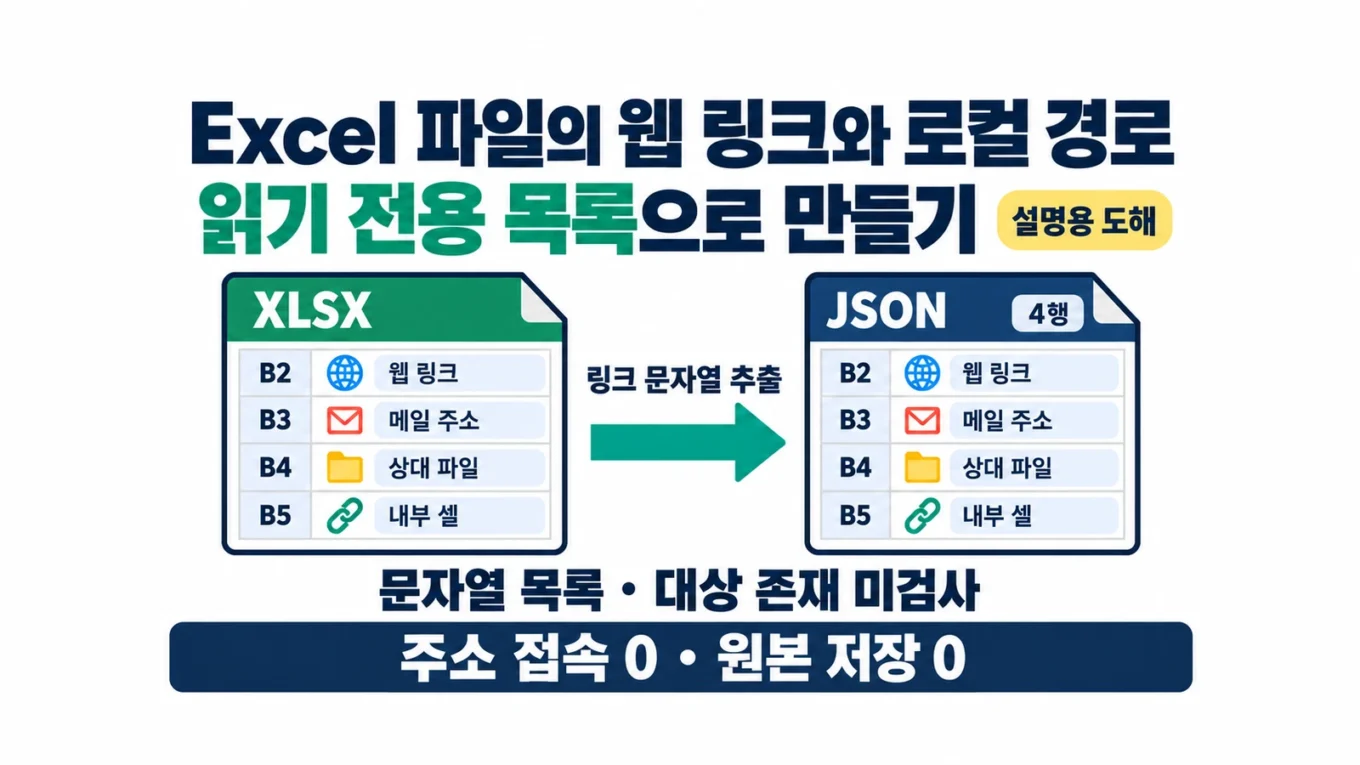
엑셀 인수인계 파일에서 링크를 하나씩 누르기 전에, 어느 셀에 어떤 주소가 들어 있는지 목록부터 만들 수 있습니다. 이 실습은 셀에 저장된 하이퍼링크 정보를 Python으로 읽어 네 행의 JSON 파일로 정리합니다. 웹페이지를 열거나 메일을 보내지 않고, 연결된 파일이나 내부 셀이 실제로 있는지도 검사하지 않습니다.
링크를 읽는 코드와 파일을 만드는 코드를 나누었습니다. 목록을 만드는 동안 원본 XLSX를 저장하지 않으며, 읽기 전후의 SHA-256이 같을 때만 새 결과 파일을 씁니다. 파일은 Linux의 Python 3.12.14와 openpyxl 3.1.5에서 검수했습니다. Excel 앱 화면이나 Windows의 링크 클릭 결과는 확인하지 않았습니다.
P46 실습 ZIP 다운로드 · 완전한 Python 코드, 합성 XLSX 3개, 고정 기대값, 자체·독립 시험과 README를 제공합니다. 압축을 푼 뒤 practice 폴더에서 명령을 실행하세요.
대표 이미지와 본문 이미지는 AI로 만든 설명용 도해입니다. 실제 Excel 화면이나 링크 안전성 검사 결과가 아닙니다. 실제 조사·실행 검수일은 2026년 10월 10일입니다.
표시 문구와 연결 주소를 따로 기록하기
셀에 ‘문서 안내’라고 보인다고 해서 그 문구가 주소인 것은 아닙니다. 하이퍼링크에는 바깥쪽 주소인 target, 문서 안의 위치인 location, 별도의 표시 속성인 display가 들어갈 수 있습니다. openpyxl의 Hyperlink 문서에서 이 속성을 확인할 수 있습니다.
출력에는 출처 시트와 셀 주소도 넣습니다. 내부 셀 링크는 target=null이고 location='요약'!B2일 수 있습니다. 주소가 비어 있다는 이유로 버리면 내부 링크를 놓칩니다. 외부 문서의 특정 위치를 가리키는 링크처럼 target과 location이 함께 있으면 두 값을 모두 남깁니다. target의 경로가 로드 중 정규화되는 경우를 피하려고, 관계 파일의 하이퍼링크는 TargetMode=External인 경우만 지원합니다. Internal이거나 이 속성이 없는 관계는 거절하고, 관계 없는 location-only 내부 셀 링크는 허용합니다.
cell_value는 참고용으로 기록한 openpyxl 일반로드 후의 Cell.value입니다. 원본 XML의 빈 셀에 하이퍼링크만 있으면 openpyxl이 주소를 셀 값으로 채울 수 있습니다. 이 필드를 원본의 표시 문자열을 그대로 복사한 값으로 단정하지 마세요. 입력 파일 자체는 저장하지 않으므로 바이트가 바뀌지 않습니다. 이 동작은 Cell의 hyperlink 설정 코드에서도 확인할 수 있습니다. 숫자·날짜 등은 Excel 화면의 표시 서식과 다를 수 있고, 날짜는 ISO 문자열로 기록합니다.
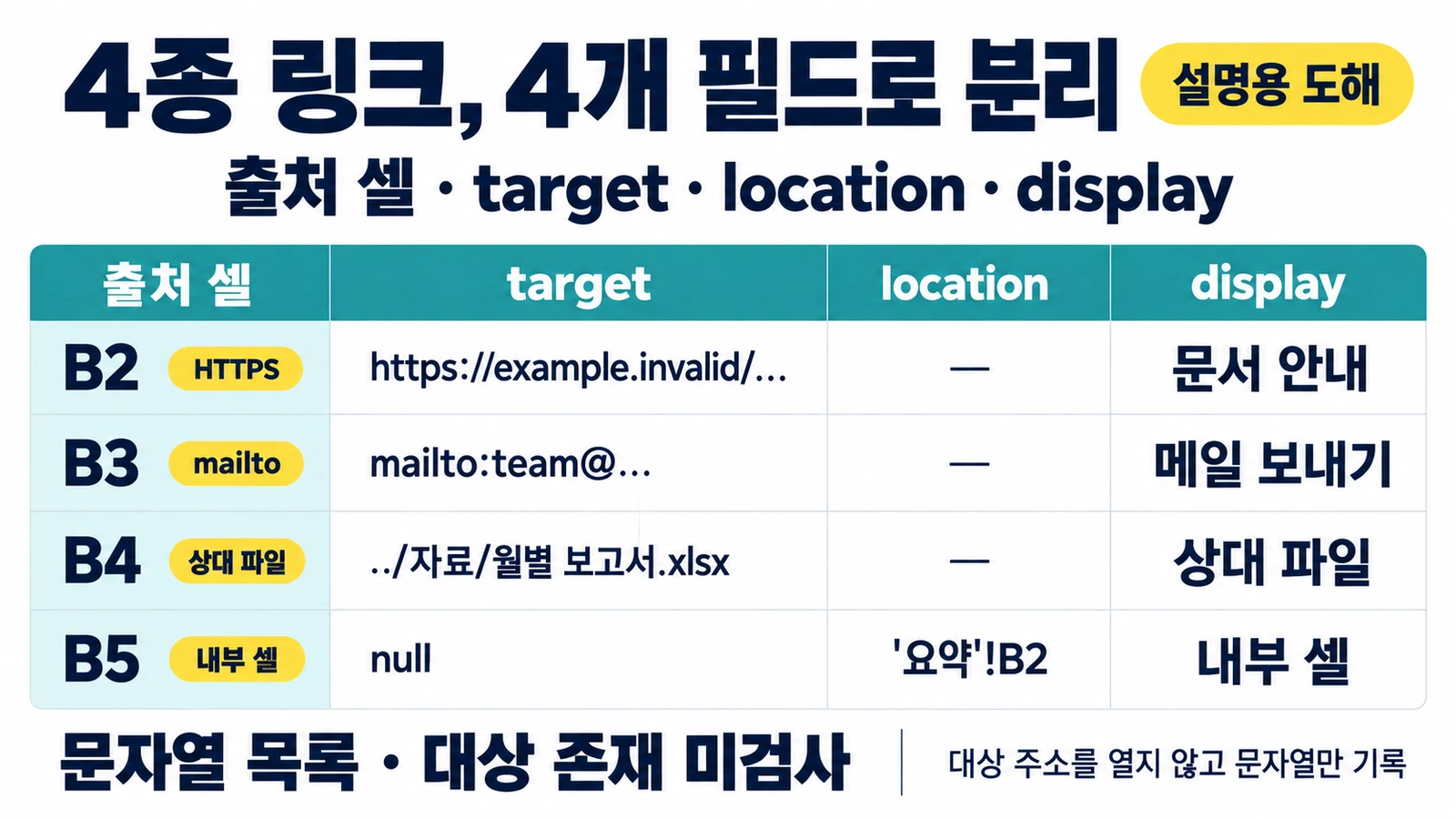
네 가지 링크가 들어 있는 연습 파일
실습 파일의 모든 주소와 문구는 가상입니다. 링크 목적지에 해당하는 웹페이지나 파일을 준비할 필요가 없습니다. 동봉한 fixtures/v1/links_sample.xlsx의 기대값은 다음과 같습니다.
화면이 좁으면 아래 표를 좌우로 움직여 주소와 모든 필드를 확인하세요.
| 출처 | target | location | display |
|---|---|---|---|
| 목록 B2 | https://example.invalid/manual |
null |
문서 안내 |
| 목록 B3 | mailto:team@example.invalid |
null |
메일 보내기 |
| 목록 B4 | ../자료/월별 보고서.xlsx |
null |
상대 파일 |
| 목록 B5 | null |
'요약'!B2 |
내부 셀 |
B2의 셀 값은 ‘공식 안내처럼 보이는 문구’로 만들었습니다. 출력의 display는 ‘문서 안내’, target은 가상 HTTPS 주소로 따로 나와야 합니다. 상대 파일 경로의 한글·공백·..도 원문 그대로 남겨야 합니다. 해당 경로를 현재 폴더 기준으로 바꾸거나 파일을 열지 않습니다.
읽기 전용 작업에서도 일반로드가 필요한 이유
load_workbook(..., read_only=True)는 대용량 읽기를 위한 별도 모드입니다. 이 모드의 ReadOnlyCell에는 hyperlink 속성이 없으므로, getattr(cell, 'hyperlink', None)처럼 넘어가면 링크가 있는 파일에서도 0행을 만들 수 있습니다. 최적화 모드 설명과 ReadOnlyCell 코드를 함께 확인하세요.
여기서는 작은 파일을 read_only=False로 읽고 save()를 호출하지 않습니다. ‘읽기 전용’은 원본을 수정·저장하지 않는 작업 방식을 뜻합니다. 옵션을 읽기 전용으로 설정했다는 뜻은 아닙니다. data_only=False는 일반 단일셀 수식을 문자열로 읽기 위한 설정이며, 수식을 계산하지 않습니다. keep_links=False는 외부 workbook 링크 보존 옵션이지 인터넷을 차단하는 보안 기능은 아닙니다. 자세한 인수는 load_workbook 문서에 있습니다.
새 JSON 파일로 실행하기
첨부 ZIP을 새 연습 폴더에 풀고 Python이 준비된 터미널에서 실행합니다. 설치가 필요한 경우 가상환경을 만든 뒤 python3 -m pip install -r requirements.txt로 동봉한 openpyxl 버전을 설치하세요. 이 글의 검수에서는 이미 설치된 환경을 사용했습니다.
python3 link_inventory.py fixtures/v1/links_sample.xlsx inventory_run.json
python3 -m json.tool inventory_run.json
첫 명령은 OK: 4 links; input SHA-256 ...를 표시하며 종료 코드 0으로 끝납니다. 결과의 link_count는 4, formula_cell_count는 0입니다. links의 순서는 B2, B3, B4, B5이고 종류는 web_text, mail_text, relative_path_text, internal_location입니다.
분류는 문자열의 형태만 보고 붙인 이름입니다. 예를 들어 https://로 시작해 web_text가 되어도 유효한 URL이라는 판정은 아닙니다. 내부 location을 찾았어도 그 셀이 존재하는지 확인한 결과는 아닙니다. 주소 유효성·접근권한·안전성을 판단하려면 별도의 검토가 필요합니다.
출력은 open('x') 방식으로 새 파일만 만듭니다. 같은 명령을 두 번 실행하면 기존 결과 파일 때문에 종료 코드 2로 멈춥니다. inventory_run_02.json처럼 새 이름을 주면 됩니다. Python의 파일 열기 문서에 있는 배타적 생성 모드를 사용하므로 기존 파일을 덮어쓰지 않습니다.
CSV 대신 JSON을 쓰는 이유
링크 문구나 주소에는 =, +, -, @로 시작하는 문자열이 들어갈 수 있습니다. CSV를 스프레드시트로 열 때 이런 값을 수식으로 해석할 위험이 있습니다. 따옴표나 다른 문자를 앞에 붙이면 추출한 원문과 값이 달라지므로 이 실습은 JSON을 선택했습니다. 위험과 변환 시 주의점은 OWASP의 CSV Injection 설명을 참고하세요.
JSON은 Python json 모듈로 문자열·숫자·null 등을 기록한 결과입니다. 텍스트 편집기나 위의 json.tool 명령으로 확인하세요. 나중에 Excel·CSV로 가져오는 과정까지 안전하게 해 주는 형식은 아니므로, 변환할 때는 수식 처리와 공유 범위를 다시 검토해야 합니다.
완전한 실습 코드
아래 코드는 동봉한 link_inventory.py와 같습니다. ZIP 구조와 범위를 먼저 확인한 다음 셀 하이퍼링크 metadata를 읽습니다. 네트워크 요청 코드나 workbook 저장 코드는 없습니다.
완전한 Python 코드 펼치기 (link_inventory.py)
"""Small trusted XLSX cell-hyperlink inventory. Never opens link destinations."""
from __future__ import annotations
import argparse
import hashlib
import io
import json
import math
from pathlib import Path
import re
import sys
import warnings
import xml.etree.ElementTree as ET
from zipfile import BadZipFile, ZIP_DEFLATED, ZIP_STORED, ZipFile
from openpyxl import load_workbook
from openpyxl.utils.exceptions import CellCoordinatesException
from openpyxl.utils.cell import coordinate_from_string, column_index_from_string, range_boundaries

MAX_FILE_BYTES = 2 * 1024 * 1024
MAX_TOTAL_BYTES = 8 * 1024 * 1024
MAX_MEMBER_BYTES = 2 * 1024 * 1024
MAX_MEMBERS = 128
MAX_RATIO = 100
MAX_CELLS = 20000
MAX_LINKS = 5000
MAIN_NS = '{http://schemas.openxmlformats.org/spreadsheetml/2006/main}'
HYPERLINK_REL = 'http://schemas.openxmlformats.org/officeDocument/2006/relationships/hyperlink'
BLOCKED_PREFIXES = ('xl/drawings/', 'xl/media/', 'xl/externallinks/', 'xl/embeddings/',
                    'xl/activex/', 'xl/querytables/', 'xl/pivottables/', 'xl/pivotcache/',
                    'xl/charts/', 'xl/chartsheets/')

class InventoryError(ValueError):
    """The input is outside this deliberately narrow exercise."""

def sha256(data: bytes) -> str:
    return hashlib.sha256(data).hexdigest()

def read_small(path: Path) -> bytes:
    if path.suffix.lower() != '.xlsx' or path.is_symlink() or not path.is_file():
        raise InventoryError('INPUT: 일반 .xlsx 파일을 지정하세요. 심볼릭 링크는 지원하지 않습니다.')
    with path.open('rb') as f:
        data = f.read(MAX_FILE_BYTES + 1)
    if len(data) > MAX_FILE_BYTES:
        raise InventoryError('SIZE: 입력 파일 크기 제한을 넘었습니다.')
    return data

def _coordinate(ref: str) -> None:
    col, row = coordinate_from_string(ref)
    if not (1 <= column_index_from_string(col) <= 16384 and 1 <= row <= 1048576):
        raise InventoryError('CELL: 잘못된 셀 주소입니다.')

def preflight(data: bytes) -> None:
    """Bounded ZIP/XML check, not a security sandbox for hostile files."""
    try:
        with ZipFile(io.BytesIO(data)) as z:
            infos = z.infolist()
            names = [i.filename for i in infos]
            if len(infos) > MAX_MEMBERS or len(names) != len(set(names)):
                raise InventoryError('ZIP: 멤버 수 제한 또는 중복 이름입니다.')
            if not {'[Content_Types].xml', 'xl/workbook.xml'}.issubset(names):
                raise InventoryError('ZIP: XLSX 필수 구조가 없습니다.')
            if sum(i.file_size for i in infos) > MAX_TOTAL_BYTES:
                raise InventoryError('ZIP: 압축 해제 크기 제한을 넘었습니다.')
            rectangle_total = stored_cells = hyperlink_total = 0
            for item in infos:
                name = item.filename
                low = name.lower()
                if '\\' in name or name.startswith('/') or '..' in name.split('/'):
                    raise InventoryError('ZIP: 지원하지 않는 멤버 경로입니다.')
                if (item.flag_bits & 1 or item.compress_type not in (ZIP_STORED, ZIP_DEFLATED)
                        or item.file_size > MAX_MEMBER_BYTES
                        or item.file_size > max(1, item.compress_size) * MAX_RATIO):
                    raise InventoryError('ZIP: 암호화·압축 방식·크기·압축비 제한입니다.')
                if (low.startswith(BLOCKED_PREFIXES) or 'vbaproject' in low
                        or low == 'xl/connections.xml' or low.endswith('.vml')):
                    raise InventoryError('SCOPE: 매크로·도형·외부 연결 등의 파일은 지원하지 않습니다.')
                payload = z.read(item)  # CRC is checked; nothing is extracted to disk.
                if not (low.endswith('.xml') or low.endswith('.rels')):
                    continue
                try:
                    text = payload.decode('utf-8-sig')
                except UnicodeDecodeError as exc:
                    raise InventoryError('XML: 이 실습은 UTF-8 XML만 지원합니다.') from exc
                if '\x00' in text or '<!DOCTYPE' in text.upper() or '<!ENTITY' in text.upper():
                    raise InventoryError('XML: DTD·ENTITY 선언은 지원하지 않습니다.')
                root = ET.fromstring(text)
                if low.endswith('.rels'):
                    for rel in root:
                        if rel.get('Type') == HYPERLINK_REL and rel.get('TargetMode') != 'External':
                            raise InventoryError('SCOPE: hyperlink 관계는 TargetMode=External만 지원합니다.')
                        if rel.get('TargetMode') == 'External' and rel.get('Type') != HYPERLINK_REL:
                            raise InventoryError('SCOPE: 셀 하이퍼링크 이외의 외부 관계는 지원하지 않습니다.')
                if low == '[content_types].xml':
                    if any('macroenabled' in x.get('ContentType', '').lower() for x in root):
                        raise InventoryError('SCOPE: 매크로 형식은 지원하지 않습니다.')
                if root.tag == MAIN_NS + 'worksheet':
                    max_row = max_col = 1
                    for cell in root.iter(MAIN_NS + 'c'):
                        formula = cell.find(MAIN_NS + 'f')
                        if formula is not None and formula.get('t') not in (None, 'normal'):
                            raise InventoryError('SCOPE: 배열·데이터표·공유 수식은 지원하지 않습니다.')
                        ref = cell.get('r', '')
                        _coordinate(ref)
                        col, row = coordinate_from_string(ref)
                        max_row = max(max_row, row)
                        max_col = max(max_col, column_index_from_string(col))
                        stored_cells += 1
                    dimension = root.find(MAIN_NS + 'dimension')
                    if dimension is not None:
                        c1, r1, c2, r2 = range_boundaries(dimension.get('ref', ''))
                        if any(x is None for x in (c1, r1, c2, r2)):
                            raise InventoryError('CELL: 전체 행·열 범위는 지원하지 않습니다.')
                        max_row = max(max_row, r2); max_col = max(max_col, c2)
                    merged_bounds = []
                    for merge in root.iter(MAIN_NS + 'mergeCell'):
                        c1, r1, c2, r2 = range_boundaries(merge.get('ref', ''))
                        if (any(x is None for x in (c1, r1, c2, r2))
                                or not (1 <= c1 <= c2 <= 16384 and 1 <= r1 <= r2 <= 1048576)):
                            raise InventoryError('CELL: 지원하지 않는 병합 범위입니다.')
                        max_row = max(max_row, r2); max_col = max(max_col, c2)
                        merged_bounds.append((c1, r1, c2, r2))
                    seen_refs = set()
                    for link in root.iter(MAIN_NS + 'hyperlink'):
                        ref = link.get('ref', '')
                        _coordinate(ref)  # Range hyperlinks are excluded.
                        col, row = coordinate_from_string(ref)
                        col = column_index_from_string(col)
                        key = (col, row)
                        if key in seen_refs:
                            raise InventoryError('SCOPE: 같은 셀의 중복 하이퍼링크는 지원하지 않습니다.')
                        seen_refs.add(key)
                        if any(c1 <= col <= c2 and r1 <= row <= r2
                               for c1, r1, c2, r2 in merged_bounds):
                            raise InventoryError('SCOPE: 병합 범위 안의 하이퍼링크는 지원하지 않습니다.')
                        max_row = max(max_row, row)
                        max_col = max(max_col, col)
                        hyperlink_total += 1
                    rectangle_total += max_row * max_col
                    if max(rectangle_total, stored_cells) > MAX_CELLS or hyperlink_total > MAX_LINKS:
                        raise InventoryError('CELL: 셀 범위·개수 또는 링크 수 제한입니다.')
    except InventoryError:
        raise
    except (BadZipFile, OSError, RuntimeError, ValueError, TypeError, KeyError, ET.ParseError, CellCoordinatesException) as exc:
        raise InventoryError('FORMAT: 손상되었거나 지원 범위를 벗어난 XLSX입니다.') from exc

def classify(target: str | None, location: str | None) -> str:
    """Text shape only: never URL validity or local-file existence."""
    if target is not None and location:
        return 'target_with_location'
    if target is None:
        return 'internal_location' if location else 'empty_metadata'
    low = target.lower()
    if low.startswith(('https://', 'http://')):
        return 'web_text'
    if low.startswith('mailto:'):
        return 'mail_text'
    if target.startswith(('/', '\\')) or re.match(r'^[A-Za-z]:[\\/]', target):
        return 'absolute_path_text'
    if not target:
        return 'empty_target_text'
    if target.startswith('#'):
        return 'fragment_target_text'
    if not re.match(r'^[A-Za-z][A-Za-z0-9+.-]*:', target):
        return 'relative_path_text'
    return 'other_target_text'

def json_value(value):
    if isinstance(value, float) and not math.isfinite(value):
        return str(value)
    if value is None or isinstance(value, (str, int, float, bool)):
        return value
    return value.isoformat() if hasattr(value, 'isoformat') else str(value)

def inventory(source: Path | str) -> dict:
    source = Path(source)
    try:
        before = read_small(source)
        preflight(before)
        with warnings.catch_warnings(record=True) as observed:
            warnings.simplefilter('always')
            wb = load_workbook(io.BytesIO(before), read_only=False, data_only=False,
                               keep_vba=False, keep_links=False)
            try:
                links = []; formulas = 0
                for ws in wb.worksheets:
                    for row in ws.iter_rows():
                        for cell in row:
                            formulas += cell.data_type == 'f'
                            h = cell.hyperlink
                            if h is None:
                                continue
                            links.append({'sheet': ws.title, 'cell': cell.coordinate,
                                          'kind': classify(h.target, h.location),
                                          'target': h.target, 'location': h.location,
                                          'display': h.display, 'cell_value': json_value(cell.value),
                                          'cell_value_type': type(cell.value).__name__})
            finally:
                wb.close()  # No workbook.save call.
        if observed:
            raise InventoryError('WARNING: openpyxl 경고가 발생했습니다. 결과를 완전한 목록으로 보지 말고 파일을 확인하세요.')
        if sha256(read_small(source)) != sha256(before):
            raise InventoryError('CHANGED: 읽는 동안 입력 파일이 달라졌습니다. 출력하지 않았습니다.')
        return {'format': 'p46-cell-hyperlink-inventory-v1', 'source_name': source.name,
                'source_sha256': sha256(before), 'link_count': len(links),
                'formula_cell_count': formulas,
                'scope': 'cell hyperlink metadata only; no destination access or existence check',
                'links': links}
    except InventoryError:
        raise
    except (OSError, ValueError, TypeError, KeyError, AttributeError, BadZipFile) as exc:
        raise InventoryError('READ: 입력을 읽지 못했습니다. 원본은 저장하지 않았습니다.') from exc

def write_json_new(destination: Path | str, result: dict) -> None:
    destination = Path(destination)
    if destination.suffix.lower() != '.json':
        raise InventoryError('OUTPUT: 출력 확장자는 .json이어야 합니다.')
    payload = json.dumps(result, ensure_ascii=False, indent=2, allow_nan=False) + '\n'
    with destination.open('x', encoding='utf-8', newline='\n') as f:
        f.write(payload)  # Existing files and symlinks are never overwritten.

def run(source: Path | str, destination: Path | str) -> dict:
    source, destination = Path(source), Path(destination)
    if source.resolve() == destination.resolve():
        raise InventoryError('OUTPUT: 입력과 출력은 다른 파일이어야 합니다.')
    result = inventory(source)
    write_json_new(destination, result)
    return result

def main() -> int:
    parser = argparse.ArgumentParser(description=__doc__)
    parser.add_argument('source', type=Path); parser.add_argument('destination', type=Path)
    args = parser.parse_args()
    try:
        result = run(args.source, args.destination)
    except (InventoryError, OSError) as exc:
        print(f'ERROR: {exc}', file=sys.stderr); return 2
    print(f"OK: {result['link_count']} links; input SHA-256 {result['source_sha256']}")
    return 0

if __name__ == '__main__':
    raise SystemExit(main())
0행과 오류를 구별해서 확인하기
formula_only.xlsx에는 =HYPERLINK(...) 수식 하나가 들어 있습니다. 이를 새 JSON으로 읽으면 정상 종료하면서 링크 0행, formula_cell_count 1이 나옵니다. 이 검사기는 셀 hyperlink 객체만 읽고 수식 인수를 해석하지 않으므로 생기는 결과입니다. ‘파일에 링크가 하나도 없다’고 바꾸어 말하면 안 됩니다.
python3 link_inventory.py fixtures/v1/formula_only.xlsx formula_run.json
python3 link_inventory.py fixtures/v1/corrupt.xlsx corrupt_run.json
python3 -m unittest discover -s tests -v
두 번째 입력은 의도적으로 손상된 합성 파일입니다. FORMAT 오류와 종료 코드 2가 나와야 하고 결과 파일은 생기지 않아야 합니다. 암호·손상 파일을 자동으로 수리하지 않습니다. 다른 파일에서 SIZE, ZIP, CELL, SCOPE, XML 오류가 나면 제한을 키워서 통과시키기보다, 지원 범위에 맞는 작은 사본을 따로 준비하세요. openpyxl 경고가 나오면 완전한 목록으로 오해하지 않도록 결과를 쓰지 않고 중단합니다.
CHANGED 오류는 두 번 읽은 입력의 SHA가 달라진 경우입니다. 다른 편집이나 동기화를 멈춘 뒤 새 결과 이름으로 재실행하세요. 두 시점의 해시 비교가 실행 중 모든 변경을 감지한다고 보장하지는 않습니다. 출력 중 디스크 부족이나 강제 종료가 발생하면 새 JSON이 불완전할 수 있으므로 파싱 여부를 확인하고 다른 이름으로 다시 실행합니다.
작은 신뢰 파일에 한정하기
입력은 일반 .xlsx 중 2 MiB 이하로 제한합니다. ZIP 멤버는 128개, 멤버별 압축 해제 크기는 2 MiB, 합계는 8 MiB, 압축비는 100 이하입니다. 전체 시트의 셀 직사각형 합계와 저장 셀 수는 20,000 이하, 하이퍼링크는 5,000개 이하로 검사합니다. 멀리 떨어진 셀·링크·병합 범위도 범위 계산에 포함합니다.
이 제한은 연습용 경계입니다. CPU·메모리·실행시간을 강제 제한하는 sandbox는 아니며 출처를 모르는 파일을 안전하게 처리한다고 보장하지 않습니다. 일반로드는 메모리를 사용하므로 임의의 실제 업무 파일을 넣지 말고, 이 글에서는 동봉한 합성 파일만 사용하세요.
배열·데이터표·공유 수식, 여러 셀에 걸친 hyperlink ref, 같은 셀의 중복 링크, 병합 범위 안의 링크, UTF-8 이외 XML, DTD·ENTITY 선언, .xls·.xlsb·.xlsm, 매크로·도형·그림·차트·피벗·외부 workbook·데이터 연결이 있는 파일은 지원하지 않습니다. 관련 파트가 발견되면 거절합니다. 수식으로 만든 링크는 metadata 목록에 포함되지 않을 수 있습니다. 이 방법으로 workbook의 모든 링크를 완전하게 찾아냈다고 결론 내릴 수 없습니다.
동봉 README에는 네 행의 기대값, 새 fixture 생성 명령, 오류별 복구 방법, 버전과 검사 제한이 정리되어 있습니다. 실제 코드 검수는 openpyxl 3.1.5에서 했고, 2026년 10월 10일 확인한 공식 stable 문서의 표시 버전은 3.1.3입니다.
함께 읽을 글
- AI 답변 링크의 주소와 근거 페이지 대조: 목록에 적힌 주소를 별도로 검토할 때 참고할 수 있습니다.
- CSV 첨부 경로와 실제 파일 대조: 이 실습에서 하지 않은 파일 존재 확인은 별개의 작업입니다.
작성자 소개
